
Your needs, this model
Does it fit your priorities?
Does U.S. SKU 960-001280 include a tabletop tripod as well as the monitor mount?
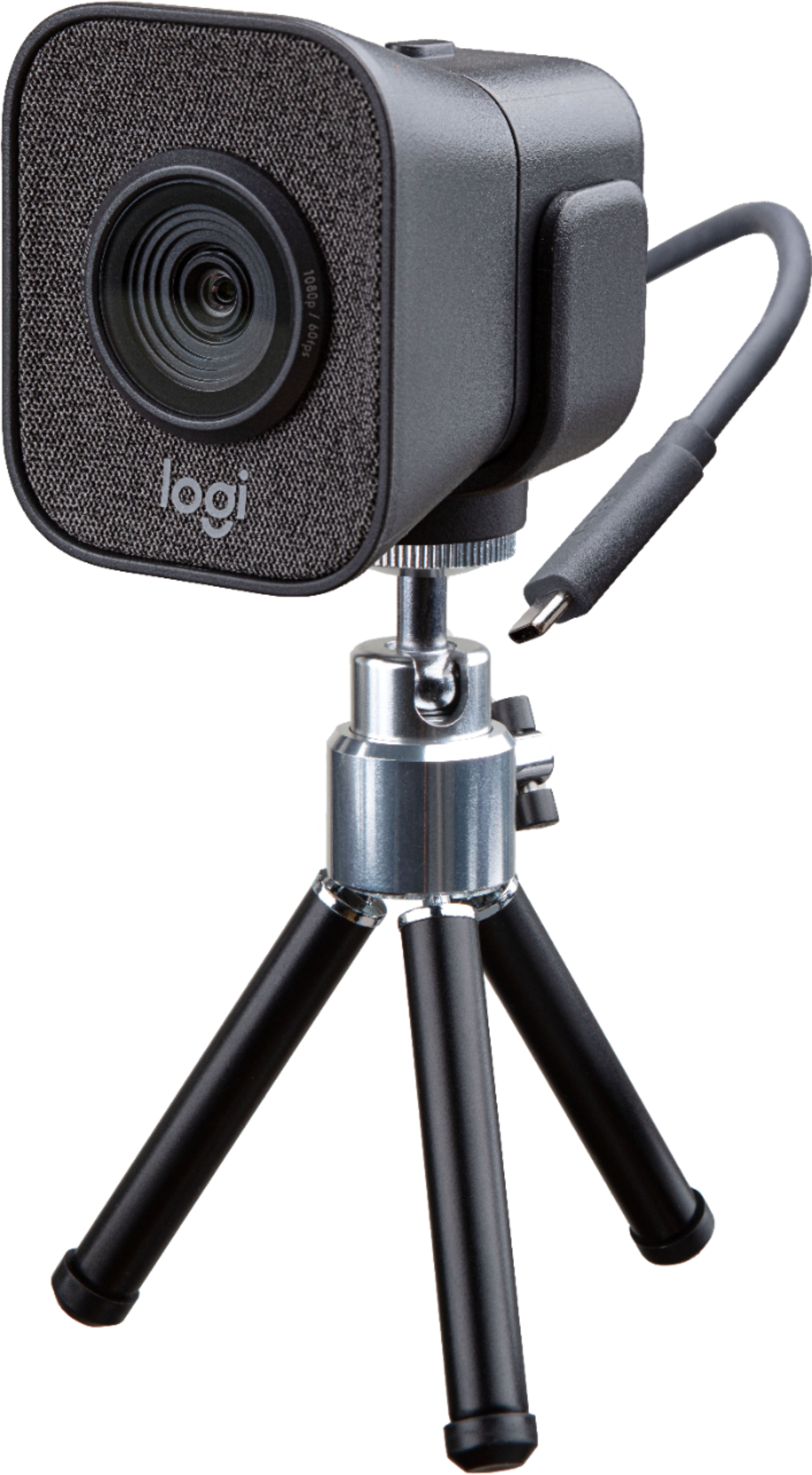
Yes. Logitech's answer on Best Buy says the StreamCam Plus includes both a tripod and monitor mount. U.S. retailer package records for the matching 960-001280/UPC also list the camera, monitor mount and tripod mount; check the exact seller's current box list because the included tripod's dimensions and condition are not established for every offer.
Explore this need in the finder →Will the StreamCam Plus hold 1080p60 through any USB-C or USB-A port?
No. Logitech recommends a direct USB 3.1 Gen 1 Type-C path for 1080p60. Its separately documented USB 2.0 adapter arrangement is limited to 720p30, so a USB-C-shaped port or USB-A adapter alone does not establish the Full HD 60 fps mode.
Explore this need in the finder →Does this package give me a built-in shutter when I use it on the desktop tripod?
No built-in privacy shutter is documented for StreamCam. The tabletop tripod changes how the camera is positioned, not how its lens is blocked; use a model with a documented physical shutter if that is essential.
Explore this need in the finder →This research-based assessment is for graphite Logitech StreamCam Plus, U.S. part 960-001280. It is an earlier package configuration, not a higher-resolution StreamCam: the camera uses the family's Full HD sensor and USB-C arrangement, while the Plus box adds a tabletop tripod alongside its monitor mount. I have not handled or tested it; this assessment uses Logitech specifications and exact-model U.S. retail records.
What the Plus package changes
The most concrete reason to choose Plus is its second camera-positioning option. Logitech's 960-001280 product data lists a camera with a five-foot USB 3.1 Gen 1 Type-C cable, monitor mount, tripod mount and documentation. In a manufacturer-authored answer on the exact StreamCam Plus page, Logitech confirms the tripod and monitor mount are included. B&H and Micro Center independently identify part 960-001280 and matching UPC 097855153210 while listing those mounts in their package contents. The image below shows the camera on a small tabletop tripod, not every box item.
That distinction matters on a crowded desk. The monitor mount is for attaching the camera at the display; the separate tripod gives a freestanding tabletop placement. It can help when a monitor is not the intended mounting surface, but neither mount makes this a remote-controlled PTZ camera. The documents do not give the tripod's height, adjustment range or footprint, so check whether that small support suits the position you need rather than assuming it can raise the lens above a monitor or reach across a work surface. Confirm that the offer is actually 960-001280 and that its box list still includes the mounts; used and seller-created packages can be incomplete or altered.
The Full HD mode has a specific host requirement
Logitech lists 1080p at up to 60 frames per second, but the strongest documented route is not just “plug in USB-C.” The manufacturer's StreamCam guidance recommends direct USB 3.1 Gen 1 Type-C for 1080p60 and gives host-computer recommendations. The camera's attached five-foot cable makes this both a bandwidth and reach question: confirm the host port, cable distance and software mode before planning around 60 fps. A USB-C connector shape alone does not establish the required path.
Logitech documents a separate lower-bandwidth fallback: USB 2.0 through its specified USB-C-female to USB-A-male adapter is limited to 720p30. That mode does not meet 1080p60. If a computer has only USB-A ports, or if the camera must sit farther away than the fixed cable reaches, check the adapter or extension path against Logitech's guidance and the application you use; do not assume an arbitrary hub preserves Full HD 60 fps. The source material does not provide a complete mode table for every calling, recording or streaming application.
Autofocus and camera audio
Logitech describes StreamCam autofocus as responding in real time and lists a 78-degree diagonal field of view. Its product information also describes auto-framing and intelligent exposure. These features suit a creator or caller who shifts position, but the published claims do not establish focus speed, tracking at every distance or results in your room. Auto-framing is software-described, not a motorized pan-and-tilt mechanism. For a static desk view, frame the camera before a session and check what the chosen app exposes.
Logitech's technical specification lists two omnidirectional microphones with a noise-reduction filter. That is built-in audio hardware, not a guarantee of clear speech over a fan, keyboard, other speakers or room echo. Keep a headset or separate mic in the plan if consistent pickup is critical.
Privacy, resolution and comparison
The StreamCam technical sheet lists no privacy shade and no camera button or switch. The tabletop tripod does not change that. If you need a physical lens cover, the Plus bundle is not a match on the documented facts. It is also Full HD, not 4K; treat “Plus” as a package distinction, not a video-quality tier above standard StreamCam.
The standard white StreamCam 960-001289 and graphite finish 960-001286 are separate identifiers from this Plus package. The Plus SKU is relevant when the included tripod is useful; a standard finish record should not be used to imply that the same tripod is in another seller's box. For a broader view, compare the standard StreamCam assessment, which discusses its USB and camera-feature tradeoffs, with the 960-001280 package here. For a different USB-A Full HD setup, the C922 has a different documented resolution/frame-rate profile; the MX Brio adds a separate 4K option and physical shutter, with different host and price-independent package checks.
Bottom line
StreamCam Plus 960-001280 is worth comparing if you want the earlier Graphite StreamCam configuration with both a monitor mount and a small tabletop tripod, and your computer can provide the documented direct USB-C 3.1 Gen 1 route for 1080p60. Its microphone hardware and autofocus are listed by the manufacturer, but those claims are not hands-on test results. It is a poor fit when 4K, an integrated physical shutter or a known USB-A 1080p60 mode is essential. Verify the exact part, seller, condition, attached cable reach and in-box mounts at the time of purchase; no price, stock guarantee or offer condition is asserted here.
Key specifications
Key details at a glance
| Documented modes and host limits | 1080p60 is listed for the direct USB 3.1 Gen 1 Type-C arrangement. The separately documented USB 2.0 adapter fallback is limited to 720p30; no 4K mode is listed. |
|---|---|
| Focus system | Autofocus |
| Diagonal field of view | 78° |
| Built-in microphone | Yes |
| Physical privacy shutter | No |
Use the exact model’s instructions for operating limits, supplied equipment and version differences.
Sources for this review
Sources for this assessment
- Logitech U.S./Canada MSRP list, June 2024
- Logitech exact-suffix StreamCam Plus route and selected product data
- Logitech StreamCam technical specifications
- Logitech recommended computer specifications for StreamCam
- Best Buy U.S. StreamCam Plus 960-001280 product questions; Logitech-authored mounting answer
- Best Buy U.S. StreamCam Plus Graphite product page, model 960-001280
- B&H U.S. StreamCam Graphite offer, manufacturer part 960-001280 and UPC 097855153210
- Micro Center U.S. StreamCam Plus Graphite support record, manufacturer part 960-001280 and UPC 097855153210
- Best Buy product image for StreamCam Plus Graphite model 960-001280

Compare the features that affect your setup
Set essential video, focus, privacy and microphone requirements together; leave nonessential choices open.