
Your needs, this model
Does it fit your priorities?
Does BCC950 meet 1080p60 or 4K?
No documented UVC camera mode does. Logitech lists 1080p at up to 30 fps over USB 2.0; the source materials do not list 1080p60 or a 4K computer-camera path.
Explore this need in the finder →Does BCC950 have autofocus and built-in audio?
Yes. Logitech identifies autofocus and documents an integrated omnidirectional microphone and full-duplex speakerphone. Its desktop stem and base are much larger than a clip-on camera; select the BCC950 video and audio devices in the operating system and call app.
Explore this need in the finder →Can the camera be physically covered when it is not in use?
Logitech's support specification says the BCC950 has no privacy shade. It fails a requirement for a built-in physical lens shutter; camera mute or motorized position is not an opaque cover.
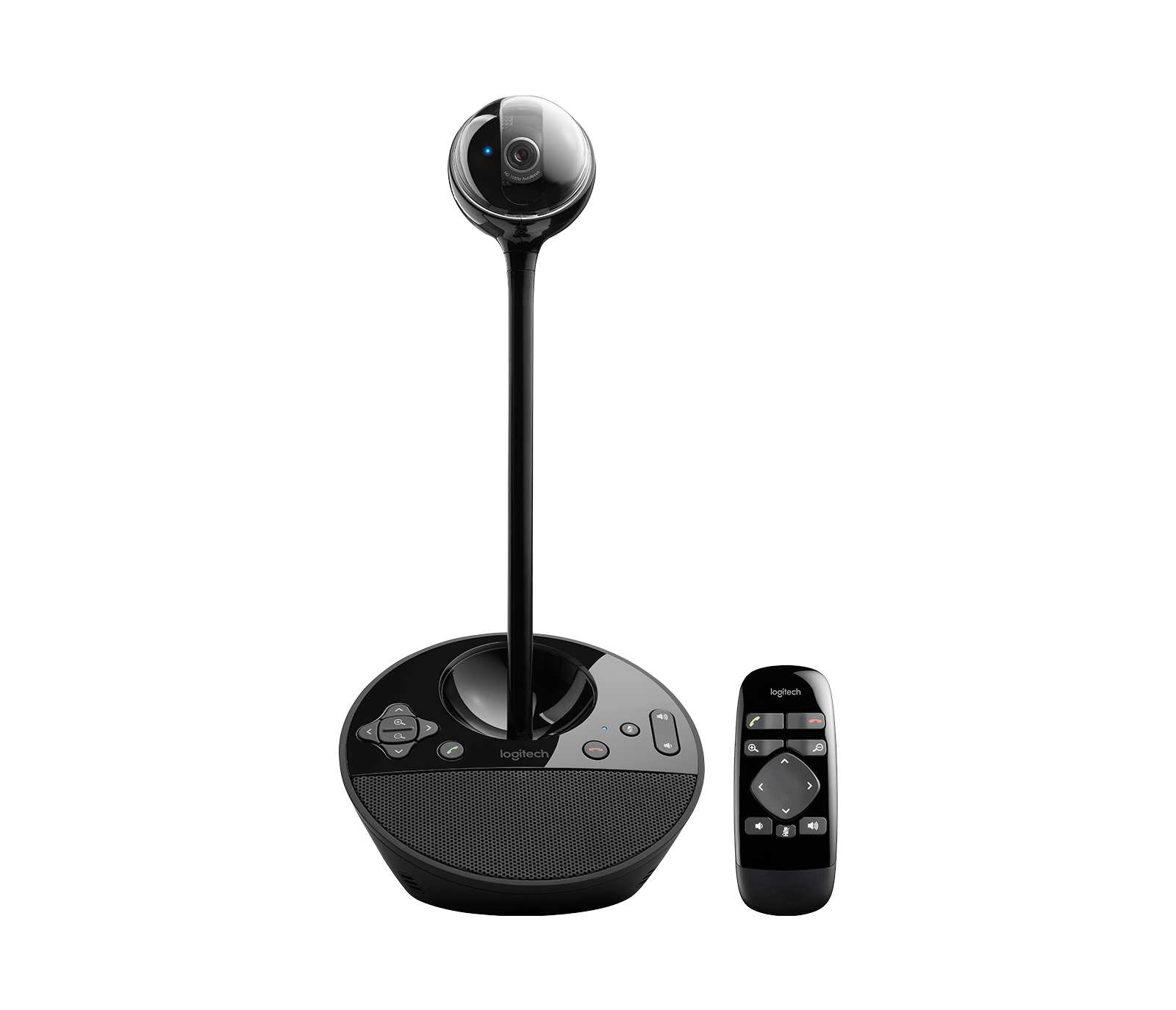
Explore this need in the finder →The Logitech BCC950 is a desktop conference camera built into a speakerphone base. That makes it a different proposition from a small camera clipped to a monitor: the camera sits on a raised stem at about eye level, while the base provides the microphone, speaker and call controls. Logitech's U.S. Conference Cameras page currently lists BCC950, and the exact product route identifies U.S. SKU 960-000866. Its UVC compatibility puts it in a computer-camera comparison, but its supported video ceiling and physical layout are modest and specific.
A conference camera with a desk footprint
The BCC950 camera has a 78-degree diagonal field of view, autofocus, motorized pan and tilt, and a small amount of zoom. Logitech describes it for private offices, home offices and small group calls; its raised camera stem can place the lens closer to seated eye level than a webcam sitting at the bottom of a screen. That is a useful layout difference when several people gather around one desk. It is also a tall, visible object with a speakerphone base and remote, not a camera that disappears on a laptop lid.
The documented UVC computer-camera path is USB 2.0, H.264 UVC 1.1 and up to 1920-by-1080 at 30 frames per second. The reviewed sources do not establish 1080p60 or 4K. If either is a hard requirement, do not confuse the product's motorized camera, optical resolution or app compatibility with a higher video mode. For a simple Full HD 30 call, the mode is clearly specified; for a faster or higher-resolution stream, it is not the right evidence-backed match.
Built-in microphone and speakerphone
The BCC950 combines an omnidirectional microphone with a full-duplex speakerphone. Logitech says the operating system should detect both video and audio components over the UVC setup, and its support article advises checking the audio and video selections in the conferencing application. That is a sensible setup check for any combined USB device: choose BCC950 for the camera, then deliberately choose its microphone and speaker if they are the audio route you want. The base also has controls for camera, volume and mute, with a handheld remote supplied.
Published microphone-distance descriptions are not identical. Logitech's current support specifications give an omnidirectional microphone distance of 2.4 meters, while the 2022 datasheet describes pickup around six feet from the base. Those are manufacturer statements, not measurements from this review, and the documents do not explain the difference. Treat the figures as planning context rather than a guarantee for your room; seating, reflective surfaces, background noise and the app's own processing can all matter. For a large table, a separate-room system such as GROUP is designed around a placed camera and speakerphone with optional microphone expansion.
Privacy and power need separate checks
The BCC950 has no physical privacy shade in Logitech's model-specific specification. A microphone mute button does not cover the lens, and camera movement is not a shutter. If an opaque built-in lens cover is essential, this model should be excluded rather than treated as suitable because its camera can pan away. Use the finder’s physical-shutter condition and compare only models with an explicitly documented cover.
Power language is also worth checking against the exact unit. The official U.S. box list includes an AC adapter. An older Logitech datasheet says the system can be powered by USB 2.0 or an AC adapter, while the support instructions tell users to connect the camera to a power source as well as to the computer's USB port. That is not enough to assume that any computer USB connection alone will power every part of a used or replacement unit. Confirm the adapter and cables are present and use the exact documented route for the device in hand.
What to verify before choosing it
Confirm the exact label “BCC950” and U.S. SKU 960-000866, the condition of the attached USB lead, the included AC adapter and remote, and that the desktop stem fits the available space. Check that your operating system recognizes the camera and audio components and that your application exposes the requested 1080p30 path. Logitech's sources describe different microphone distances, so avoid positioning it at the edge of a room based on the largest number alone. Procurement buyers should also check their own required compliance evidence: the reviewed sources make no explicit TAA statement for this exact SKU.
BCC950's all-in-one base trades the flexible placement of the modular GROUP system for fewer separate table devices. The wide, powered MeetUp bar moves the camera and room audio into a display-mounted form, but its 4K30 mode needs a user-supplied USB 3.0 cable. These are distinct ways to outfit a room, not direct picture-quality rankings. This assessment uses published specifications and support instructions; it does not claim hands-on use, compatibility testing or measured call quality. Review the connection guide and plan how the base, power, camera position and selected call-app devices fit your setup.
Key specifications
Key details at a glance
| Documented modes and host limits | Logitech documents UVC 1.1 / H.264 up to 1080p30 over USB 2.0; no higher webcam mode is listed in the reviewed exact-model materials. |
|---|---|
| Focus system | Autofocus |
| Diagonal field of view | 78° |
| Built-in microphone | Yes |
| Physical privacy shutter | No |
Use the exact model’s instructions for operating limits, supplied equipment and version differences.
Sources for this review
Sources for this assessment
Compare the features that affect your setup
Set essential video, focus, privacy and microphone requirements together; leave nonessential choices open.