
Your needs, this model
Does it fit your priorities?
Does the Ace Pro 2 make an 8K or 4K Webcam feed?
No. Its 8K and 4K figures are separate camera-recording modes. The Webcam guide states up to 1080p and 30 fps depending on meeting software, without a 4K Webcam path.
Explore this need in the finder →Can the camera provide 1080p60 in Webcam mode?
The manufacturer limits the shared Ace-series Webcam mode to up to 30 fps. It does not document 1080p60, so this model does not meet a verified 1080p60 minimum.
Explore this need in the finder →Will the camera's built-in mic work as the computer-call microphone?
The camera has built-in recording microphones, but the reviewed Webcam sources do not say whether they appear as the computer's audio input. Treat the Webcam audio endpoint as unknown and plan to select a separate host microphone unless you verify the exact app and camera in advance.
Explore this need in the finder →The Insta360 Ace Pro 2 is an action camera that can also function as a wired meeting camera on a PC. Those are two separate jobs, and its headline 8K/4K recording modes do not turn into 8K/4K calls. The shared Ace-series Webcam guide describes an output ceiling of up to 1080p and 30 fps, with the actual options depending on meeting software. This review concerns the Midnight Black, Single Battery Standard Bundle identified by U.S. Store SKU 3619; it is an evidence-based assessment of manufacturer documentation, not a hands-on test.
A supported USB meeting-camera path, with a defined limit
Insta360's Ace-series guide explicitly lists Ace Pro 2 alongside Ace and Ace Pro. The basic path is to connect the powered camera to a PC with a USB cable, select Webcam Mode from the camera's USB prompt and choose the Insta360 Ace device in the supported meeting software. The model-specific tutorial also describes selecting Webcam mode and then choosing the camera in a conferencing application. It is not simply a normal camera recording sent to the computer; the PC-facing mode is its own supported arrangement.
The guide names meeting clients and browser combinations, including Zoom, Microsoft Teams, Lifesize, Skype, PotPlayer, QuickTime Player, BlueJeans, Tencent Meeting, DingTalk and Lark. The table distinguishes clients, operating systems and browser access, so the list should not be read as a promise that every version works in every combination. Confirm the exact software and host operating system you plan to use before an important meeting.
More importantly, Insta360 says Webcam mode supports up to 1080p resolution and 30 frames per second, subject to the conferencing software. It does not give a complete set of resolution/frame-rate pairs. The strict conclusion is that no 1080p60, 4K or 4K60 Webcam mode is established by the sources reviewed here. The same guide says some in-camera video parameters—such as resolution, shooting mode, stabilization, field of view and zoom—are controlled or unavailable when the computer is using the Webcam feed. This is not the camera's full action-shooting interface mirrored onto a desktop.
Do not transfer the 8K action-camera specification
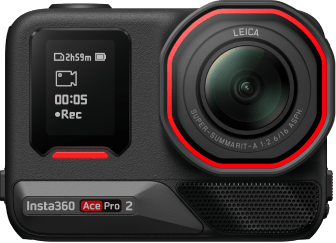
Ace Pro 2's general camera specifications include a 1/1.3-inch sensor, a Leica SUMMARIT lens and action-camera recording modes as high as 8K at 30 fps, with 4K recording options at still higher frame rates in specified formats. Those numbers describe footage captured to the camera, not a USB meeting-camera stream. The review therefore treats the Webcam route as a software-dependent Full HD-class feed, not as an 8K or 4K webcam.
That distinction matters most when the computer or conference app has its own camera-selection and stream-setting menus. A camera may record in a format that the Webcam path does not deliver, and the app can impose a lower choice than the maker's ceiling. If a particular output mode is essential, check the actual device in the actual meeting software rather than using the action-camera spec table as a substitute. Insta360 also explicitly says the Ace-series Webcam mode cannot connect to OBS for live streaming; the existence of other live-streaming tutorials for action-camera recording does not change that mode-specific restriction.
SKU 3619 is one package, not the whole Ace Pro 2 family
The official U.S. Store ProductGroup identifies SKU 3619 as the Midnight Black, Single Battery Standard Bundle. Its description lists the camera with a pre-installed Wind Guard, one battery, a Standard Mount, a Mic Cap and a USB-C-to-USB-C cable. The 3-prong-to-1/4-inch adapter is sold separately. These are the contents of this exact described configuration, not a general promise about every Ace Pro 2 offer.
The same Store group records 26 named variants, including different battery counts, White and Black finishes, and motorcycle, bike, winter, POV, Xplorer and other accessory bundles. The camera base remains Ace Pro 2, but package contents vary. A mount, audio accessory, memory card or lens kit shown in a different bundle should not be assumed to be included with SKU 3619 or with a later seller's listing. Match the exact variant identifier and read that package's own contents before choosing. No price, availability or stock statement is made here.
There is an additional revision caveat. Insta360's hardware table describes an Ace Pro 2 hardware transition beginning in July 2026 that changes the microphone count from three to two. The reviewed Store page identifies SKU 3619 and its package, but does not tie that SKU to one of those hardware revisions. This assessment does not guess which revision an individual unit contains, and microphone count is not treated as proof of a computer audio input.
Audio, focus and privacy remain separate checks
The hardware and audio pages describe microphones and audio controls for the action camera, but the Webcam-mode documents reviewed here do not confirm that its built-in microphones appear as a selectable PC meeting input. If your webcam must supply call audio, plan a separate computer microphone or test the exact camera, cable and app before relying on it. Do not buy on the assumption that a mic cap or wind-related accessory is a computer microphone.
The maker's Webcam material also does not establish whether meeting software receives autofocus, a fixed-focus arrangement, a built-in physical privacy shutter or a particular electronic privacy state. A general camera focus-distance specification cannot answer the Webcam focus question. Treat those fields as unknown, not as confirmed features or as proof of absence. If focus behavior or a physical shutter is essential, choose a camera whose exact Webcam-mode sources document it.
Who should consider it?
Ace Pro 2 may suit someone who already wants an action camera and values a documented secondary route for PC meetings, provided the user's app supports the camera and a software-dependent ceiling of up to 1080p/30 fps is acceptable. The package can also matter to a mobile creator, but that does not make it the most straightforward purchase for a webcam-only desk. Its action-camera format, Webcam-mode settings restrictions, app-specific compatibility and unresolved computer-audio endpoint add checks that a dedicated webcam may not require.
Compared with the earlier Ace Pro and Ace, the maker's general recording specifications differentiate sensor and capture capabilities, but their shared Webcam page gives the same basic 1080p/30fps ceiling. Those camera-recording differences should not be used to rank the three as meeting cameras. See the separate Ace Pro assessment and Ace assessment for their distinct U.S. identity and limitation records.
Bottom line: Ace Pro 2 has a real, documented USB Webcam mode for meetings, but it is not a 4K/60 webcam, and the mode is not an OBS streaming path. Verify the exact SKU and package, host/app support, power and audio setup, and camera placement. The selected SKU's revision, webcam audio endpoint, Webcam focus behavior and physical privacy shutter remain unconfirmed in the sources reviewed. Primary references: the Ace-series Webcam setup and limits, the Ace Pro 2 Webcam Mode tutorial, the Ace-series hardware table, the U.S. Ace Pro 2 product page and the U.S. Store record for SKU 3619.
Key specifications
Key details at a glance
| Documented modes and host limits | The maker's shared Ace-series Webcam page reports up to 1080p and 30 fps, software-dependent; no complete table confirms every resolution/frame-rate pair. Its separate 8K/4K capture specifications are not Webcam modes. |
|---|
Use the exact model’s instructions for operating limits, supplied equipment and version differences.
Sources for this review
Sources for this assessment
- Ace Series: Using a Camera as a Webcam for Video Meetings When Connected to PC
- Ace Pro 2: Webcam Mode
- Insta360 Ace Pro 2: 8K Camera with Leica Lens
- Insta360 U.S. Store Ace Pro 2 Midnight Black Standard Bundle SKU 3619
- Ace Series: Hardware Specifications
- Ace Series: Photo & Video Specifications
- Ace Series: Audio Mode Settings
- Official U.S. Ace Pro 2 camera render

Compare the features that affect your setup
Set essential video, focus, privacy and microphone requirements together; leave nonessential choices open.