
Your needs, this model
Does it fit your priorities?
Does exact No-Radio SKU 960-001669 meet a TAA requirement?
Logitech identifies part 960-001669 as the Rally Bar No-Radio TAA/NDAA variant. The direct model page says radios are removed and the U.S. TAA guide lists this exact part. Confirm your contract and the exact quote/delivered label; standard Rally Bar 960-001308 is different.
Explore this need in the finder →Can No-Radio be used as a USB computer camera?
Yes. Logitech supports USB mode and identifies a BYOD path. Its No-Radio specifications list the same room-bar camera modes through 4K30; the USB FAQ limits MJPEG to 4K30 and NV12/YUY2 to 1080p. This is not Android/appliance mode.
Explore this need in the finder →What does “No-Radio” remove from the room setup?
Logitech lists no Wi-Fi, Bluetooth or radio components, no supported Bluetooth remote, no Tap IP and no Android/appliance mode. The included AC supply remains necessary. Choose the exact SKU only if the USB-only operating route fits your room and security constraints.
Explore this need in the finder →Logitech Rally Bar No-Radio is the exact U.S. part 960-001669, also designated TAA/NDAA compliant in Logitech's government solutions materials. It is not the ordinary Graphite Rally Bar 960-001308 and not the TAA-labeled standard Rally Bar 960-001564. The phrase “No-Radio” describes a substantial configuration difference, not a color or accessory bundle: Logitech says Wi-Fi, Bluetooth and radio components are absent. The exact U.S. TAA guide, the No-Radio support page and the model-specific specifications all identify this as the radio-removed Rally Bar configuration.
USB-only certification is the central buying constraint
Logitech describes this edition as certified only for USB mode. It does support a USB computer-camera and BYOD path, but the manufacturer No-Radio documentation says Android/appliance mode is not supported. Its exact compatibility page marks BYOD as compatible and distinguishes the No-Radio platform compatibility from the standard Rally Bar's room-appliance options. This makes the intended workflow decisive: a room that connects a laptop to the bar over USB can be a fit; a room that expects the bar to run a meeting application natively on Android should not assume it can be deployed that way.
The radio change has everyday control consequences too. Logitech's comparison says the exact No-Radio SKU lacks Wi-Fi and Bluetooth, does not include or support the Bluetooth remote, and does not support Tap IP. Ethernet and the physical USB connection remain different routes, so this product is not simply “wireless off” in a settings menu. Those omissions may be precisely what a radio-restricted environment needs, but they require a wired control and network plan. Check room-control design before buying, rather than discovering the missing remote or appliance route during installation.
Camera and audio when the USB path fits
The No-Radio-specific Logitech specification page lists the Rally Bar camera modes from SD through 4K at 30 fps, with motorized pan, tilt and 15× HD zoom. The main camera's diagonal field is listed at 90 degrees; a separate 174-degree AI Viewfinder is for room awareness and should not be reported as the main lens view. In USB mode, Logitech's family UVC FAQ identifies the Rally Bar as a standard camera/microphone/speaker endpoint for compatible computers, with MJPEG up to 4K30 and NV12/YUY2 only through 1080p. Actual in-call output remains host- and app-dependent. There is no documented 1080p60 or 4K60 camera mode in the sources reviewed.
The exact No-Radio specifications list six beamforming microphones, two speakers and a manufacturer-stated pickup range up to 7 m (23 ft). That figure is not a measured speech-quality result. The system supports additional Rally Mic Pods for larger rooms, which brings more placement and cabling questions. The USB route carries camera/audio data, but the bar still needs its listed AC supply. Its room-scale size, integrated stand, separate power and optional mounting choices make it a facility camera system, not a compact monitor webcam.
Identity, image and package details
Logitech's U.S. TAA/NDAA guide lists Rally Bar No-Radio as part 960-001669 and distinguishes it from a separate No-Radio room kit that includes a Tap Cat5e controller and two microphones. The standalone camera bar and that kit are not the same package. The No-Radio support specifications list the Bar, power supply, AC cord, HDMI and USB leads, lens caps and user documentation, while Logitech's No-Radio comparison explicitly says a remote is not included or supported. Verify the exact seller box and regional power cord, especially if an offer title merges room kits and standalone parts.
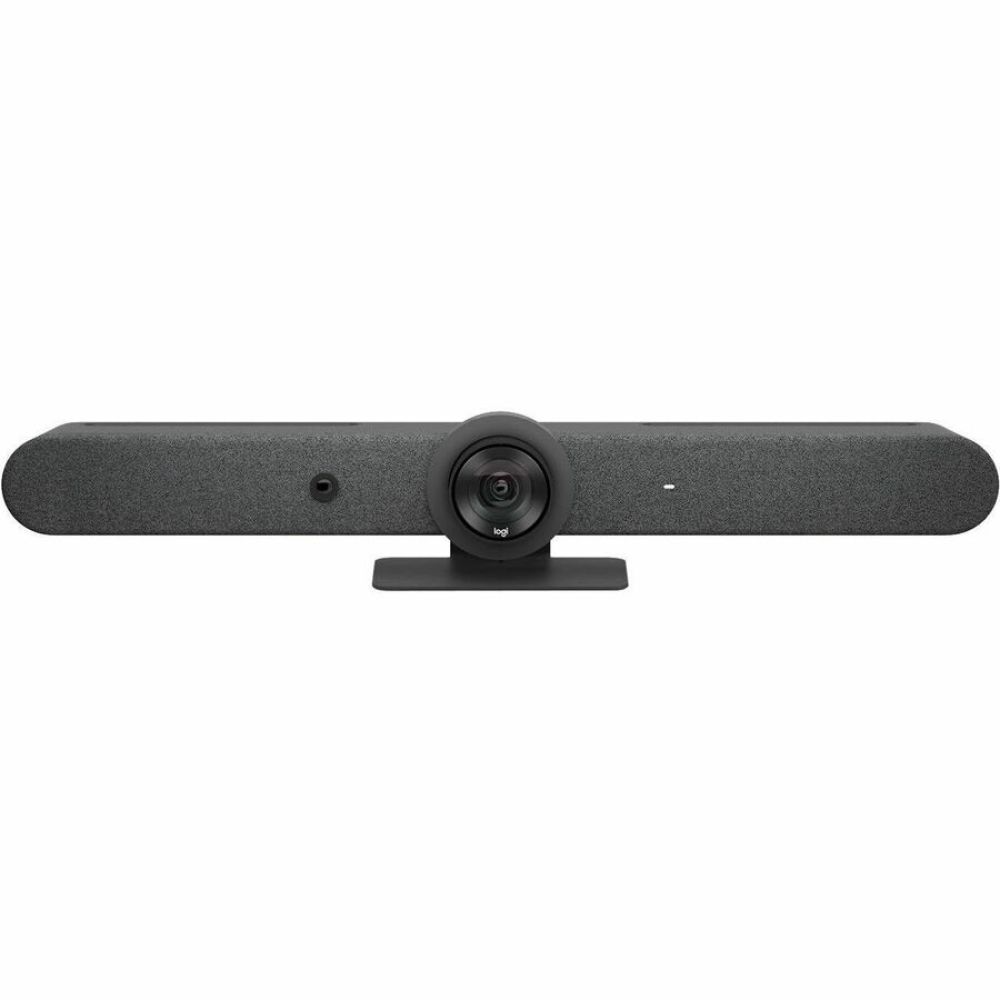
The photo shown on this assessment was attached to a U.S. reseller listing for exact MPN 960-001669. It shows the external Rally Bar enclosure only; the absence of internal radio hardware cannot be proved by looking at a front image. Logitech's support documents, not the photo, are the evidence for the No-Radio feature and mode restrictions. This transparent image limitation is important because the standard and No-Radio bars can look alike from the front.
Who should compare it
Shortlist this version when exact 960-001669 identity, radio removal and a USB-only computer workflow are part of the deployment. The TAA/NDAA description is a product-level statement, not automatic approval under a particular public-sector contract; procurement should validate the contract, seller offer and delivered model identifier. If you only need a TAA Rally Bar while retaining the ordinary configuration, compare the separate Rally Bar TAA SKU 960-001564. If you need a broad view in a smaller room, compare the Rally Bar Mini TAA SKU 960-001563.
Before selecting No-Radio, confirm that every required meeting app and room controller will work in the intended USB arrangement, plan Ethernet and cable reach, and ensure the separate AC supply can be installed. No Radio is not an autofocus upgrade, a shutter, or an improvement in measured image quality; those specifications are not established by the compliance label. Its value is the exact radio-free configuration and its supported USB mode. Where an appliance meeting platform, Tap IP or wireless remote control is a must, the No-Radio edition's documented restrictions outweigh its shared Rally Bar camera hardware.
Key specifications
Key details at a glance
| Documented modes and host limits | The No-Radio-specific Rally Bar support specifications list camera modes through 4K at 30 fps. The UVC FAQ lists USB MJPEG up to 4K30 and NV12/YUY2 only up to 1080p. Call output remains app-dependent; 4K60 is not documented. |
|---|---|
| Diagonal field of view | 90° |
| Built-in microphone | Yes |
| Physical privacy shutter | No |
| TAA-compliant exact SKU | Yes |
Use the exact model’s instructions for operating limits, supplied equipment and version differences.
Sources for this review
Sources for this assessment
- Logitech U.S. Conference Cameras catalogue snapshot
- Logitech Rally Bar U.S. product route, Graphite SKU 960-001308
- Logitech Rally Bar datasheet
- Logitech Rally Bar support specifications
- Logitech Rally Bar USB camera and UVC support FAQ
- Logitech Rally Bar setup guide
- Logitech Rally Bar No-Radio exact-part support article
- Logitech Rally Bar No-Radio specifications
- Logitech Rally Bar No-Radio certifications and compatibility
- Logitech U.S. TAA/NDAA compliant solutions guide
- VoIP Supply exact-MPN Rally Bar No-Radio listing
- VoIP Supply exact-MPN Rally Bar No-Radio product photo

Compare the features that affect your setup
Set essential video, focus, privacy and microphone requirements together; leave nonessential choices open.