
Your needs, this model
Does it fit your priorities?
Does the C920e SKU 960-001384 have a built-in microphone?
The exact C920e TAA datasheet labels 960-001384 mic disabled and its footnote points to Logi Tune to activate the microphones. Logitech’s online support page describes the process but carries an AI-translation warning, so confirm the current English instructions and whether your device policy permits the utility. If not, plan separate audio or compare the distinct mic-enabled SKU 960-001401.
Explore this need in the finder →Is the C920e SKU 960-001384 documented as TAA compliant?
Yes. Logitech's model-specific TAA datasheet lists 960-001384 as the mic-disabled C920e, and later Logitech government-solutions material repeats the exact number. Verify the complete SKU and procurement route with the responsible buyer; this listing is not an approval for a particular contract.
Explore this need in the finder →Does the C920e 960-001384 have an integrated privacy shutter?
No. The package list names an attachable privacy shade; it is a separate cover rather than a mechanism built into the camera body. It can cover the lens physically, but it does not satisfy a requirement specifically for a built-in shutter.
Explore this need in the finder →Does the C920e 960-001384 support 1080p at 60 fps?
No 1080p60 mode is listed in Logitech's C920e TAA datasheet. It lists 1080p30 and 720p30, so Full HD resolution should not be read as a 60 fps capability.
Explore this need in the finder →This review covers the Logitech C920e Business Webcam, U.S. TAA part number 960-001384: the configuration Logitech identifies as microphone-disabled. It is not the same purchase configuration as the C920e 960-001401 reviewed elsewhere on this site. The assessment relies on Logitech's C920e TAA datasheet and later government-solutions listings. The TAA datasheet itself points to Logi Tune to activate the microphones; Logitech's online support instructions describe the same path, but that page carries an AI-translation notice, so treat its procedural wording as corroboration and confirm current English instructions with your administrator. No hands-on call, video or sound test was performed.
The part number changes the audio setup
The defining difference is not a new lens or a higher video ceiling. Logitech lists two C920e part numbers in its TAA datasheet: 960-001401 is mic enabled and 960-001384 is mic disabled. A datasheet footnote points to Logi Tune for microphone activation. The separate online support page gives steps, but it displays an AI-translation accuracy warning; rely on the exact SKU datasheet for the disabled/enabled distinction and confirm the current English procedure before relying on it. Together, the model-specific evidence supports treating 960-001384 as a camera with integrated microphone hardware that is not ready to supply camera audio until the activation step is confirmed. None of it proves that a particular agency-managed computer permits the utility, that a user has installation rights or that an administrator has not blocked the control.
If camera-side audio is essential, check the actual host and policy before choosing this configuration. A separate headset or microphone is the safer plan when software installation is unavailable. If you need the C920e microphone enabled by default, compare the distinct 960-001401 configuration; do not assume the shared “C920e” name makes the two setups interchangeable. The microphone distinction is a functional reason to keep separate SKU assessments.
Full HD means 30 fps here
The model-specific TAA datasheet lists 1080p at 30 fps and 720p at 30 fps. It does not list 1080p60, 720p60 or 4K. The word “Full HD” describes the resolution, not the frame rate, so this is a better fit when a standard 30 fps meeting feed is sufficient than when a 60 fps mode is mandatory. The document also lists a fixed 78-degree diagonal field of view and autofocus. Those labels can help frame a single person at a desk, but they do not establish focus speed, the image in a particular room or how a meeting application will negotiate its stream.
Logitech lists RightLight 2 automatic light correction and 1.2× digital zoom in the TAA sheet. Treat those as manufacturer-described controls, not a promise that the camera will correct a backlit room or retain detail at every crop. Before procurement, compare the supported capture mode with the calling app, host and monitor requirements rather than relying on the headline resolution alone.
The privacy piece is attachable, not built in
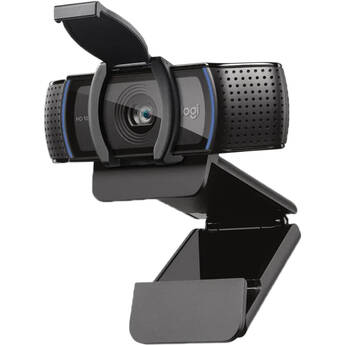
The C920e package list includes a privacy shade that attaches over the lens. That offers a physical cover, but it is separate from the camera housing; it does not meet a buyer's strict requirement for a built-in shutter. It also controls only the lens, not the microphone or another camera selected by the computer. Keep the shade with the webcam if the hardware is moved between rooms, and verify that the exact seller package includes it.
Plan for its cable and mount
The documented connection is USB-A through an attached 1.5-meter cable. The package list does not describe the cable as detachable, so measure the path from the camera position to a reachable USB-A port before settling on a monitor arm or desk location. A USB-C-only computer will need a compatible separately planned adapter or dock; the reviewed box list does not establish that an adapter is supplied. The C920e has a universal clip and a quarter-inch tripod thread, but a tripod is explicitly not included. These small package details can matter more than a spec-sheet maximum in a managed office where accessories are controlled.
What the TAA listing establishes
Logitech's TAA datasheet and its later government-solutions material identify 960-001384 as the mic-disabled C920e TAA part. That is useful evidence for a procurement shortlist when the responsible buyer requires an exact manufacturer-listed part. It is not a determination that an offer meets every clause in a contract, that a particular seller is authorized or that the delivered box has the requested suffix. Confirm the complete number on the quote, item label and invoice, and ask the purchasing team to validate the sourcing route.
There is a practical source caveat: the U.S. Logitech route whose URL ends in 960-001384 still has conflicting embedded product metadata that identifies the sibling 960-001401. A separate Dell U.S. product page observed on 2026-11-02 identifies the C920e manufacturer part 960-001384 (Dell part 68PJHK) and lists a package containing the camera with its attached USB-A cable, a privacy shutter and user documentation. That retailer listing is evidence of a specific seller page, not a guarantee of stock or of the delivered carton. For the mic-disabled distinction and physical cover construction, rely on Logitech's exact TAA datasheet: its package description identifies an attachable privacy shade, not a built-in shutter. Confirm the complete number on the quote and product label before procurement.
Who should keep this C920e on the list?
Consider 960-001384 when procurement specifically wants the manufacturer's TAA-listed microphone-disabled configuration, a 1080p30 ceiling is enough, a USB-A connection reaches the intended position and the team can decide whether Logi Tune activation is allowed. It is not the uncomplicated pick for someone who needs audio working immediately, a built-in privacy shutter, a detachable cable, 60 fps or 4K. If the mic must remain unavailable for policy reasons, verify that the disable state is enforced on the actual installation rather than treating a default setting as a security guarantee.
These are source-based fit judgments, not reports of camera ownership, installation or measured performance. For setup planning, see the webcam connection and audio guide; for the physical distinction between built-in and attachable covers, see the privacy and ownership guide. The separate C920e 960-001401 assessment explains the mic-enabled sibling, whose part number and default audio state should be checked independently.
Manufacturer references: C920e TAA datasheet; Logitech wired government solutions; C920e microphone activation instructions (page carries an AI-translation notice).
Key specifications
Key details at a glance
| Documented modes and host limits | The C920e TAA datasheet lists 1080p30 and 720p30; it does not list a 60 fps or 4K mode for this model. The U.S. 960-001384 configuration is expressly microphone-disabled by default. |
|---|---|
| Focus system | Autofocus |
| Diagonal field of view | 78° |
| Built-in microphone | Yes |
| Physical privacy shutter | No |
| TAA-compliant exact SKU | Yes |
Use the exact model’s instructions for operating limits, supplied equipment and version differences.
Sources for this review
Sources for this assessment
- Logitech C920e Business Webcam U.S. product route with 960-001384 suffix
- Logitech C920e HD Webcam TAA datasheet (2021)
- Logitech for Government quick guide: personal workspace webcam SKUs
- Logitech wired solutions for government (2025)
- Logitech federal video conferencing solutions (2024)
- Logitech support: how to activate the C920e microphones
- Logitech C-Series webcams for business portfolio (2024)
- Logitech C920e U.S. exact-suffix route current recheck
- Logitech C920e HD 1080p Mic-Disabled, certified for Zoom and Microsoft Teams, TAA Compliant | Dell USA
Compare the features that affect your setup
Set essential video, focus, privacy and microphone requirements together; leave nonessential choices open.