
Your needs, this model
Does it fit your priorities?
Does PanaCast 20 support 4K at 60 fps?
No 4K60 mode is listed. Jabra's technical sheet specifies 4K at 30 fps, plus 1080p30 and 720p30. A 4K minimum can match its documented USB 3.0 arrangement, but a 4K60 minimum cannot.
Explore this need in the finder →Is the privacy cover built into the camera?
Yes. Jabra describes an integrated sliding lens cover, and the manual shows its switch. This is a physical lens block, not a software-off control.
Explore this need in the finder →Can I use its built-in microphones immediately?
The camera has three built-in microphones, but Jabra's manual says they are off by default. Enable them in Jabra Direct, then confirm the intended call app selects the PanaCast microphone; the published pickup range is not an audio-quality test.
Explore this need in the finder →Does SKU 8300-119 satisfy an explicit TAA requirement?
The reviewed manufacturer TAA list names TAA8300-119, not standard SKU 8300-119. The standard record is therefore unknown for strict TAA matching; confirm the full SKU and the buyer's own sourcing rules.
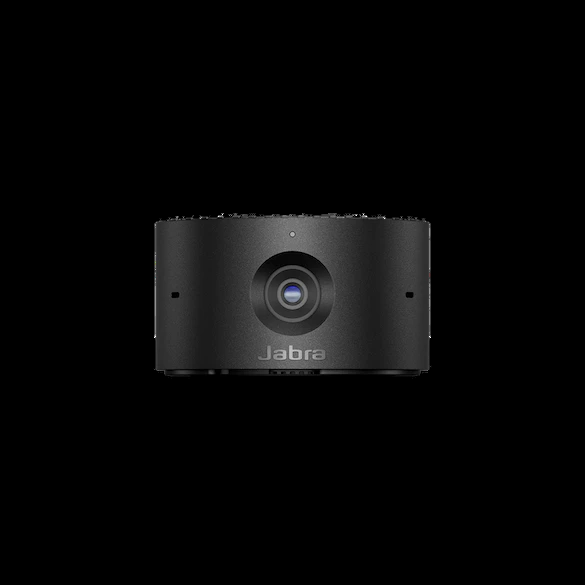
Explore this need in the finder →Jabra's PanaCast 20 is a personal video camera built around a small monitor clip, onboard processing and software controls. This assessment covers standard U.S. item 8300-119. Jabra lists 4K at 30 fps, 1080p30 and 720p30, with an integrated sliding privacy cover and three microphones. This is a source-based review, not a hands-on test of image quality, audio or tracking.
Put the 4K label in context
The technical sheet pairs 3840 × 2160 with 30 frames per second; it also lists 1920 × 1080 at 30 fps and 1280 × 720 at 30 fps. It does not list 1080p60 or 4K60. If you need Full HD at 60 fps for motion or a particular production workflow, that requirement is not met by the modes Jabra publishes. Do not substitute the sensor's 13-megapixel count for an application-ready output mode.
Jabra warns that an operating system or computer may not support every higher resolution, so check the camera settings in the actual meeting or recording app. The listed modes are a manufacturer capability table, not a guarantee that every host exposes them. Jabra's user manual describes direct computer connection through USB 3.0. Its technical sheet also allows USB 2.0 only when the port supplies more than 500 mA; the reviewed sources do not say which video modes survive that lower-speed route. Treat the documented mode list as the USB 3.0 plan, not as a USB 2.0 promise.
Check the cable and the actual computer port
The model sheet lists a 1.5 m USB-C-to-USB-A USB 3.0 cable in the package. The camera's port is USB-C, but the supplied host end is USB-A; someone planning to use a USB-C-only computer should verify a compatible data cable or adapter and enough reach before ordering. A USB-C-shaped port is not proof of a particular data rate, and Jabra Direct is part of the settings workflow rather than a substitute for a working video data connection.
The manual says Jabra Direct is available for Windows and macOS, not ChromeOS. It lists Windows 10 or later, macOS 10.15 or later and ChromeOS for basic use. Jabra's page lists common meeting-platform certifications, but those statements do not guarantee that an organization's app policy permits the software controls or that each setting is exposed on a given machine.
Frame the desk, then decide whether software control suits you
The published field of view is 90° horizontal, 75° vertical and 117° diagonal. That describes how much of the room can enter the frame from the camera position; it is not a promise of a flattering perspective. The monitor clip is adjustable, and the manual shows software pan, tilt and zoom controls in Jabra Direct. Those commands adjust the picture; PanaCast 20 is not a motorized PTZ head.
Jabra lists Intelligent Zoom, which centers the image on a person, and up to 3× lossless digital zoom at 720p. These are manufacturer features, not evidence of response speed, motion quality or equivalent 3× detail at other resolutions. The manual also documents Picture-in-Picture for a close-up view and a larger scene, while warning that PIP is unavailable with background blur enabled. That interaction matters if both effects are essential: choose the one that solves the call's main task, and verify the current software behavior.
Do not confuse microphones with guaranteed audio
The technical sheet lists three MEMS microphones, and the manual states an optimal pickup range up to 2.5 m. It also says the microphones start off and can be toggled in Jabra Direct. Enable them, then check that the conferencing app selects PanaCast 20 as its input and that the managed computer permits the setting. The range is a manufacturer figure, not an independent test of clarity in a reverberant room or beside a keyboard. If the computer blocks Jabra Direct or the room is noisy, plan an independent audio device.
The privacy cover is physical; optical focus is not specified
Jabra identifies an integrated sliding cover that physically blocks the lens. The manual illustrates the cover switch, making this a more direct privacy check than a software camera-off state. Slide it shut when privacy is needed and reopen it for calls; inspect the lens and cover area before framing so the physical block is not mistaken for a camera fault.
Jabra documents Intelligent Zoom, but the reviewed English U.S. sources do not say whether the lens itself uses fixed focus or autofocus. Software cropping and subject-centering do not answer that optical question. If a specific focus system is a hard requirement, this review cannot confirm the PanaCast 20 meets it; use the finder results and ask Jabra or the seller for exact documentation rather than inferring focus from the word “Intelligent.”
What the package and procurement labels mean
The model-level sheet lists the camera, a protective carry case and the 1.5 m USB-C-to-USB-A cable; the adjustable clip is part of the camera design. It does not list a table stand, which Jabra presents separately as an accessory. Confirm that the delivered offer matches item 8300-119 and that the lead, case and any separately needed stand are actually included. A different retailer bundle can change the box contents.
Jabra separately lists TAA8300-119 as a TAA PanaCast 20 part. That is a procurement distinction, not an image-mode upgrade. Standard 8300-119 is not credited as TAA-compliant here because the reviewed TAA source names the prefixed part, not the standard SKU. Read the separate TAA assessment and confirm the full part number, seller and purchasing route with the procurement owner.
Who should consider standard PanaCast 20?
Consider item 8300-119 if a compact monitor-mounted personal camera with a physical shutter, built-in microphones and a documented 4K30 USB 3.0 mode matches the use case. Look elsewhere if 60-fps Full HD, autofocus specifically, a known mode matrix over USB 2.0, or a confirmed standard-SKU TAA declaration is essential. Before buying, verify the exact part, included cable and case, host data path, Jabra Direct policy and app mode options. No measured image, mic, HDR or tracking result is claimed here.
Key specifications
Key details at a glance
| Documented modes and host limits | 4K30 is listed; Full HD and 720p are listed at 30 fps. No 1080p60 or 4K60 mode is documented. |
|---|---|
| Diagonal field of view | 117° |
| Built-in microphone | Yes |
| Physical privacy shutter | Yes |
Use the exact model’s instructions for operating limits, supplied equipment and version differences.
Sources for this review
Sources for this assessment
Compare the features that affect your setup
Set essential video, focus, privacy and microphone requirements together; leave nonessential choices open.