
Your needs, this model
Does it fit your priorities?
Which PanaCast 20 part number does Jabra identify as TAA compliant?
The 2026 Jabra TAA list names TAA8300-119. Verify that exact prefix and digits on the quotation and received item; standard 8300-119 is a separate exact SKU and does not inherit the TAA record.
Explore this need in the finder →Does the TAA part provide 1080p60?
No. The model-specific technical sheet lists 4K30, 1080p30 and 720p30, not 1080p60 or 4K60. The TAA prefix does not change those published video modes.
Explore this need in the finder →Does camera audio work without configuration?
Jabra lists three built-in microphones, but the user manual says they are off by default and can be enabled in Jabra Direct. Confirm the app and managed host can select that input.
Explore this need in the finder →Does the product's TAA listing approve my order?
No. Jabra's list identifies the product SKU. A purchasing owner still needs to confirm the solicitation, source, contract terms, seller, offer and documentation for the actual order.
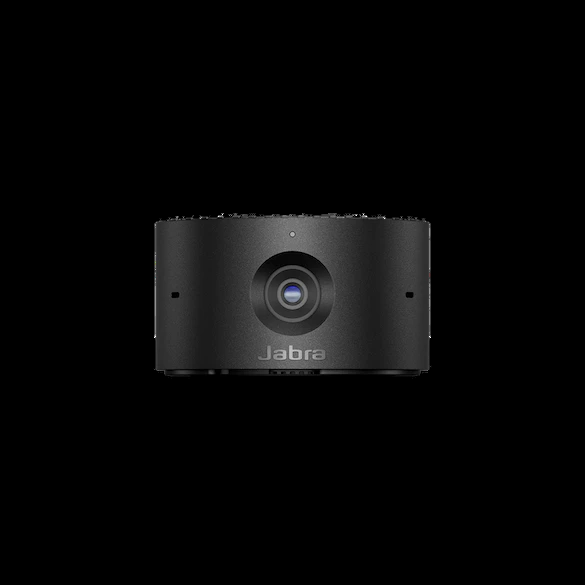
Explore this need in the finder →This assessment is for Jabra PanaCast 20 TAA, U.S. part TAA8300-119. Jabra's 2026 TAA solutions list names that exact part as a PanaCast 20 SKU; the standard 8300-119 is a different identifier and does not inherit the declaration. The camera's model-level sheet describes 4K30, 1080p30 and 720p30 output, a sliding physical lens cover and three microphones. This is a document-based assessment, not a test or a procurement approval.
Start with the exact part number
The procurement case for this variant is its TAA-prefixed identifier. Jabra's 2026 TAA list names TAA8300-119, PanaCast 20 and Mexico as country of origin. A separate May 2026 Jabra Warranty+ mapping also lists both 8300-119 and TAA8300-119 as PanaCast 20 product SKUs. Those manufacturer records help distinguish the TAA model from standard 8300-119, but they do not determine whether this item, seller, channel or order satisfies a particular federal, state, institutional or contractual requirement.
Match the complete prefix and digits against the approved purchase request, quote, delivered item and documentation. A family label, similar image or retailer title without the exact part is not enough. The official public sources reviewed here do not provide an exact TAA8300-119 shopping carton list or a live seller offer, so verify the contents and current terms on the actual offer. Never treat an affiliate assessment as legal advice or procurement sign-off.
The TAA marking does not change the camera modes
The Jabra PanaCast 20 technical sheet lists 3840 × 2160 at 30 fps, 1920 × 1080 at 30 fps and 1280 × 720 at 30 fps. It does not list 1080p60 or 4K60. The TAA prefix is a procurement identifier, not evidence of a higher frame rate. Jabra also cautions that higher resolutions may not be supported by every computer or operating system. Confirm that the exact conferencing or capture app exposes the desired 4K30 mode on the intended host.
The user manual instructs direct computer operation through USB 3.0. The technical sheet notes USB 2.0 support only when the port provides more than 500 mA, but the maker does not publish a separate USB 2.0 video-mode list. Therefore this comparison credits the listed video modes to the USB 3.0 arrangement only. A fallback USB 2.0 port may make the camera enumerate, but its resulting resolution and frame rate remain unknown in the evidence reviewed.
Plan the connection rather than relying on the connector shape
PanaCast 20 has a USB-C camera connector. Its model-level technical sheet lists a 1.5 m USB-C-to-USB-A USB 3.0 cable and a protective carry case, while the manual shows a foldable monitor or laptop clip. Because the package list is not separately keyed to TAA8300-119 in the sources reviewed, check the precise offer for the cable and case rather than assuming a seller's bundle is identical. A USB-C port's shape does not prove its webcam data capability; confirm the computer, dock or approved cable supports USB 3.0 data.
Jabra Direct provides camera settings, pan/tilt/zoom controls and firmware management. Jabra lists Windows 10 or later and macOS 10.15 or later, with ChromeOS also listed for use; the manual says Jabra Direct is not supported on ChromeOS. On a managed machine, confirm that the software is permitted and that the chosen app can access the camera. No current enterprise policy, host compatibility or retailer warranty is assumed.
Built-in privacy and camera audio still have setup conditions
The PanaCast 20 model documentation describes an integrated sliding cover that physically blocks the lens. It also lists three MEMS microphones. These are useful capabilities when privacy and in-camera audio matter, but the manual says the microphones are off by default. Use Jabra Direct to enable them, then choose the camera as the app's input and verify permissions. The published optimal pickup distance of up to 2.5 m is not an independent clarity test or a guarantee in a noisy room.
Jabra's field-of-view table lists 90° horizontal, 75° vertical and 117° diagonal. The camera also supports Intelligent Zoom and up to 3× lossless digital zoom at 720p. These product claims do not prove how natural the framing looks or how quickly it reacts; keep the camera near the intended eye line and verify the app's view. Optical focus type is not specified in the reviewed sources. Do not equate software subject-centering with autofocus.
Feature interactions worth checking before deployment
Jabra's manual lists Vivid HDR and picture-in-picture, but says HDR is disabled by default and PIP is not supported while background blur is enabled. If both visual effects are part of a managed standard, test whether the deployment software can configure them as intended. The maker's feature list does not establish that every effect runs concurrently, and no low-light, motion, exposure or tracking test was performed for this review.
Three microphone elements and a physical cover do not automatically make the camera right for a room system: PanaCast 20 is presented in Jabra's personal-video-camera category as a compact clip-on unit. It is not an all-in-one room bar or a standalone speakerphone assessment. Consider room size, microphone route, camera position and policy separately instead of extending a personal-camera spec sheet into a room-scale guarantee.
Who should compare TAA8300-119?
Consider this exact SKU when a purchasing owner needs Jabra's documented TAA-listed PanaCast 20 part and the technical camera limits suit the personal-call workflow. Compare it with standard item 8300-119 only after deciding whether the procurement record is required; the two SKU records have the same PanaCast 20 model-level camera specifications in the sources, but the standard part does not inherit the TAA label. Read the standard PanaCast 20 assessment for the base camera discussion.
Before an order, verify TAA8300-119 on the actual quote and delivered documentation, ask procurement to validate the sourcing path, check included items, confirm USB 3.0 data and software policy, and test the desired camera and microphone in the intended app. Look elsewhere for 4K60 or 1080p60. The analysis makes no claim about image quality, microphone quality, live inventory or current price.
Key specifications
Key details at a glance
| Documented modes and host limits | 4K30 is listed; Full HD and 720p are listed at 30 fps. No 1080p60 or 4K60 mode is documented. |
|---|---|
| Diagonal field of view | 117° |
| Built-in microphone | Yes |
| Physical privacy shutter | Yes |
| TAA-compliant exact SKU | Yes |
Use the exact model’s instructions for operating limits, supplied equipment and version differences.
Sources for this review
Sources for this assessment
Compare the features that affect your setup
Set essential video, focus, privacy and microphone requirements together; leave nonessential choices open.