
Your needs, this model
Does it fit your priorities?
Can the classic Razer Kiyo meet a 1080p60 minimum?
No. Razer lists 1080p30 and a separate 720p60 mode for RZ19-02320. A 60 fps setting at 720p does not meet a Full HD at 60 fps requirement; choose a model with a documented 1080p60 arrangement if that is essential.
Explore this need in the finder →Does the classic Kiyo have autofocus and a built-in microphone?
Razer specifies autofocus and an omnidirectional built-in microphone for support model RZ19-02320. Those feature specifications do not establish focus-transition quality or how the mic will sound in your room. The earlier-model filter must be enabled to include this camera.
Explore this need in the finder →Is a physical privacy shutter confirmed for this Kiyo?
The reviewed product and support sources do not establish a built-in physical shutter for RZ19-02320. Do not count it toward a required-shutter setup on this record; check the exact unit or choose a model with a documented integrated cover.
Explore this need in the finder →Does the Kiyo package include a tripod?
Razer's model-specific support table says the tripod is not included, although the camera has a 1/4-20 thread. Verify any seller-created bundle rather than assuming the mounting thread means a tripod is in the box.
This research-based assessment concerns the classic Razer Kiyo, support model RZ19-02320. B&H's U.S. page capture names MPN RZ19-02320100-R3U1; PCNation item 02PP40 and Office Depot item 7319549 list the same MPN, and Office Depot also lists UPC 814855025046. PCNation marked its exact-MPN page Out of Stock when checked on 2026-11-01; the older B&H capture says “No Longer Available.” These retailer records do not establish a Razer-hosted suffix map or an active offer. The current Razer Streaming Cameras category is a separate seven-variant snapshot of newer Kiyo V2 products; the classic Kiyo belongs in the earlier-model comparison, not in that current listing. I have not handled or tested this camera.
An integrated light changes the desk setup
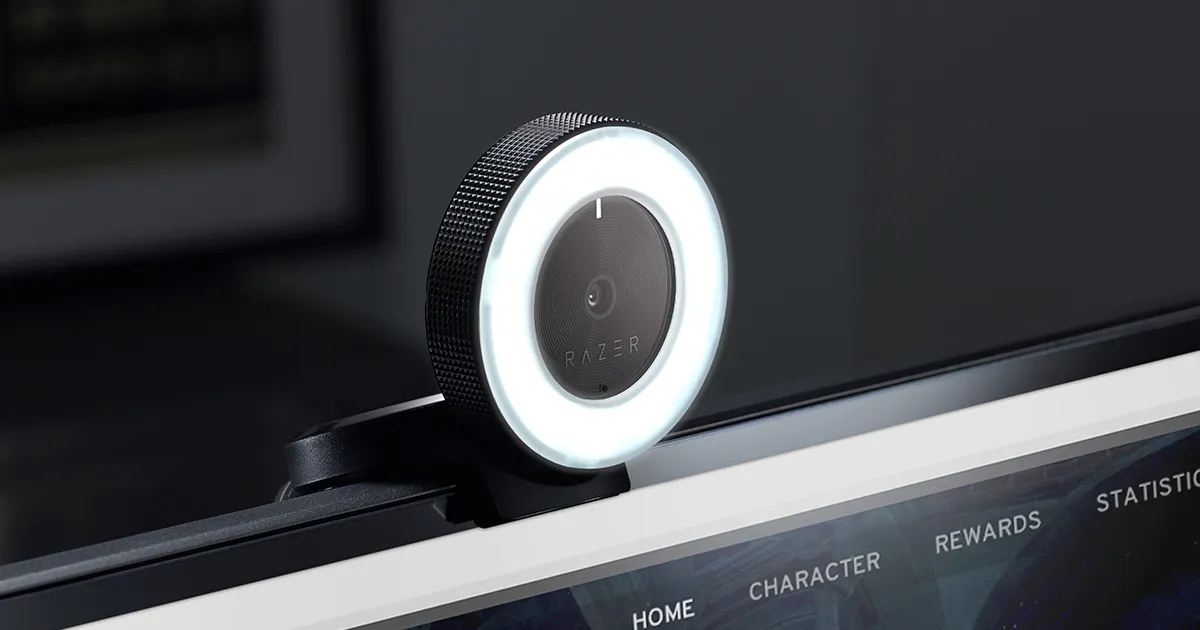
The clearest difference from an ordinary small webcam is the Kiyo's circular light built into the face of the camera. Razer describes a 5600 K daylight-balanced ring light that is adjusted by rotating the light itself, while its model-specific support table lists 12 white LEDs, a diffuser, a 12-step brightness dial and a manufacturer figure of 10 lux at one metre. This is a concrete lighting control within reach of the lens; it is not an independent light-performance test or a promise that the camera will brighten a dim room evenly. If a front-facing fill light is already part of your intended setup, that built-in control may be convenient. If you need a separate key light, a soft source, or control over light placement and direction, the Kiyo's fixed ring around the camera does not replace that planning.
Choose detail or motion, not both at Full HD 60
Razer lists 1080p at 30 frames per second and 720p at 60 frames per second for this model. The lower-resolution 60 fps mode trades detail for more frequent frames; it does not become 1080p60. The official support table also lists 480p30 and 360p30 and identifies a USB 2.0 connection. It gives the available encodings as YUY2/MJPEG or H.264, but the retained specifications do not pair every encoding with every resolution and frame rate, so I would check which modes the chosen computer and application actually expose rather than assemble a best-of-both specification from separate rows. The camera is not a 4K option. Anyone who needs a documented 1080p60 minimum should treat this model as a negative match and compare a camera with that exact mode.
Autofocus and built-in audio have limits too
Razer's support specification calls the focus type autofocus and lists a built-in omnidirectional microphone with a 16-bit, 48-kHz audio codec. That establishes useful components, not a measured focus transition or a sound-quality result. It does not say how the microphone will handle a reverberant room, keyboard noise or distance, and it does not prove the capture mode selected in one application will be available in another. Razer names Synapse 4 for image controls and says the camera works with OBS and XSplit. Check the exact system, app version, camera mode and audio-input selection before depending on a particular workflow; the sources reviewed here do not give a current operating-system compatibility matrix for this model.
Position, cable and privacy need separate checks
The support table specifies an L-shape joint, flexible clip, 1/4-20 tripod thread and a 1.5 m braided cable; it explicitly says the tripod is not included. Razer's product page describes monitor or desk placement and a detachable tripod setup. Measure that cable route and confirm the included mount against the actual part being offered, especially if an older unit is sold with replacement accessories. The official page and support record I reviewed do not establish a built-in physical privacy shutter for the RZ19-02320, so this assessment does not count it as a shutter match. If a covered lens between meetings is essential, verify a physical cover for the exact unit or choose a model whose manufacturer documents an integrated shutter. The built-in light is not a privacy indicator, and closing software is not the same as covering the lens.
How to compare it with newer Kiyo models
The current Kiyo V2 family should not be treated as a finish or accessory variation of the classic unit. The V2 assessment documents a different 4K30 camera, a physical shutter, USB-C and its own format limits; the classic Kiyo is distinguished by its integrated ring light and 1080p30/720p60 choices over USB 2.0. Those are different tradeoffs rather than evidence that one is better in every room. A streaming buyer deciding between the two should first settle the minimum resolution and frame rate, whether the ring light belongs in the camera position, and whether a physical lens cover is required. For a stable call, a separate microphone or a lighting rig may matter more than the Kiyo's streaming-specific dial.
What to verify before considering a specific unit
Search by both support model RZ19-02320 and, where a retailer part number is shown, RZ19-02320100-R3U1; “Kiyo,” “Kiyo Pro,” “Kiyo X” and Kiyo V2 name different cameras. Confirm the actual unit, original cable, flexible clip, physical condition of the ring-light dial and LEDs, microphone operation, included mounting pieces, return terms and seller. For MPN RZ19-02320100-R3U1, PCNation's item record lists the camera with attached USB 2.0 cable and one Important Product Information Guide; this is a page-level seller package list, not proof of contents or completeness in an individual unit. The Razer Kiyo Master Guide lists the camera and information guide and says no tripod is included. PCNation marked its item out of stock on 2026-11-01; B&H's older capture says “No Longer Available.” Neither record establishes present orderability. Do not assume a marketplace bundle is the standard Razer package or that a legacy model is currently available.
Key specifications
Key details at a glance
| Documented modes and host limits | The listed high-resolution mode is 1080p30; 60 fps is listed at 720p. No 1080p60 or 4K mode is documented for RZ19-02320. |
|---|---|
| Focus system | Autofocus |
| Diagonal field of view | 81.6° |
| Built-in microphone | Yes |
Use the exact model’s instructions for operating limits, supplied equipment and version differences.
Sources for this review
Sources for this assessment
- Razer Kiyo U.S. family page
- Razer U.S. Streaming Cameras category — seven listed current variants
- Razer Kiyo classic U.S. product page
- Razer Kiyo RZ19-02320 Support & FAQs
- Official Razer Kiyo product-page image asset
- Razer Kiyo webcam — official U.S. product page
- Razer Kiyo Master Guide — English
- Razer Kiyo RZ19-02320 Support & FAQs
- B&H Razer Kiyo Full HD Webcam with Ring Light — exact retailer MPN listing
- PCNation Razer Kiyo Webcam — exact MPN listing and package record (item 02PP40)
- Office Depot Razer Kiyo Webcam — item 7319549

Compare the features that affect your setup
Set essential video, focus, privacy and microphone requirements together; leave nonessential choices open.