
Your needs, this model
Does it fit your priorities?
Does the Meet Flip meet a 4K-at-60-fps minimum?
No. Its manufacturer mode list gives 4K up to 30 fps and separately lists 1080p up to 60 fps. The two maxima are not a 4K60 capability.
Explore this need in the finder →Can the physical lens cover and built-in microphones coexist as features?
Both are documented for an open, operating Meet Flip: the hardware has dual microphones and a folding lens cover. When the lens is folded closed, the manual says the unit enters sleep mode and the microphone is unavailable, so privacy and live audio cannot be used simultaneously in the closed position.
Explore this need in the finder →Is the USB-C Meet Flip usable with a USB-A computer or Linux host?
The base [Pack] lists a USB-C-to-C cable and a USB-C-to-USB-A adapter, and the model FAQ says standard UVC camera functionality works on Linux. OBSBOT Center is not available on Linux, so its proprietary controls should not be assumed there; check host power and the intended app.
Explore this need in the finder →This is a source-based assessment of manufacturer documentation, not a hands-on test. It does not claim measured image or microphone quality, ownership, or current seller stock.
What the mode list actually supports
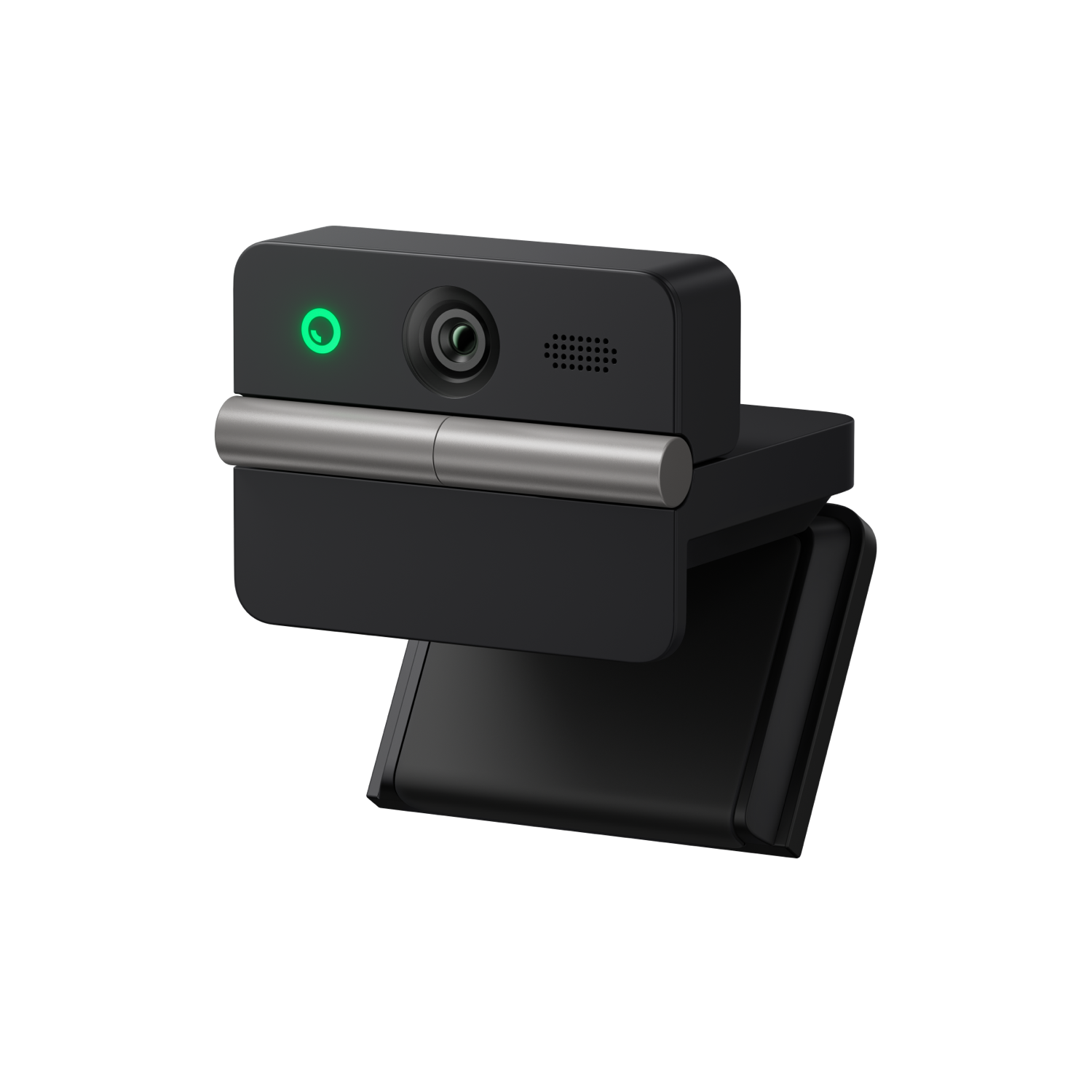
Meet Flip is a small external webcam rather than a camera that follows you around a room. OBSBOT documents a 1/2-inch CMOS sensor, a 48-megapixel effective-pixel figure, autofocus with phase detection, manual-focus control in its own software, and four-times digital zoom. Its mode table lists 3840 × 2160 at up to 30 fps, then 1920 × 1080 and 1280 × 720 at up to 60 fps. Those are separate choices: this assessment does not read 4K30 plus 1080p60 as a 4K60 camera. The supported 4K modes are MJPEG; the listed YUV modes are only 640 × 480 and 640 × 360. If 4K60 or a particular uncompressed format is a hard requirement, look elsewhere in the reviewed library rather than extrapolating from sensor resolution.
The listed diagonal field of view is 79.1 degrees in 4:3 and 72 degrees in 16:9. That is a fixed lens view, not motorized tracking. OBSBOT's auto-framing feature adjusts composition in software; the camera has no documented pan-tilt mechanism. Four-times digital zoom and framing controls can crop into the source, so they should not be mistaken for extra optical reach or tested tracking smoothness.
A literal physical privacy position
The body folds downward to cover the lens. The manual says that closing it puts the device into sleep mode, and that the microphone is unavailable in this state. This is more than an on-screen privacy setting, but it is not a separately documented microphone mute while video continues: use the cover when you want the camera asleep, and choose audio separately when the camera is open. The FAQ also documents an auto-sleep mode and says the remote control is sold separately.
The 37.7-gram camera has a built-in adjustable stand for monitor or laptop placement and a standard 1/4-20 tripod thread. OBSBOT recommends a screen no thicker than 20.5 mm for stable mounting. The source package list does not include a tripod, and a clip-on setup should be checked against the actual screen shape, cable outlet and hinge clearance before purchase.
Audio and software are part of the setup
The technical page describes one omnidirectional and one directional microphone, with Directional, Dual-Directional, Smart Omni and Pure Audio modes. That is evidence of the hardware and available controls, not an independent call-quality result. The closed-cover sleep behavior matters if you expect the camera to double as an always-on microphone.
OBSBOT Center exposes more camera controls, but the manufacturer's FAQ draws a useful Linux distinction: the camera supports standard UVC video on Linux, while the proprietary Center application is unavailable there. The download page lists Center for Windows 10 64-bit or later and macOS 11 or later. The manual recommends at least a tenth-generation Intel Core i5 and 8 GB of RAM for its higher-rate modes, with M1-class Apple computers recommended; 4K beauty/background effects have additional graphics requirements. These are compatibility conditions to check against the actual computer and meeting app, not a promise that every effect or mode runs on every host.
USB 2.0 is a real qualification
The specifications identify a USB 2.0 Type-C data port. The base [Pack] lists a USB-C-to-C cable and a USB-C-to-USB-A adapter; the manual advises using the standard supplied cable and connecting directly to the computer, or to an independently powered expansion dock if power is insufficient. A 4K webcam label alone does not mean a USB 3 interface. OBSBOT also says 4K streaming requires compatible third-party software. Check the host port, available power and the app's exposed capture modes rather than assuming the camera's highest listed mode appears automatically.
Package and version checks
The official U.S.-store page distinguishes the Meet Flip [Pack] from a Combo that adds an HQ Mic. This review and its default buying assessment refer to the base camera package, not that extra microphone bundle; the extra mic is not a built-in capability, and the product FAQ says the Meet Flip is not compatible with OBSBOT Vox SE. Verify the exact package name, both supplied USB pieces, return terms and physical condition for any seller offer. OBSBOT's reviewed pages do not state an exact part number or TAA status, so neither should be assumed.
In short, Meet Flip combines a fold-to-cover privacy mechanism, autofocus, built-in audio and a genuinely compact host-mounted design. It is a more feature-rich camera than a basic fixed-focus 1080p model, yet its 4K30 ceiling, USB 2.0 connection, software/host conditions and audio-unavailable sleep position define its limits. Compare it with a camera whose published 4K60 mode is verified if frame rate at full resolution matters; choose the Meet Flip only when the supported 4K30 or 1080p60 plan matches the computer, app and framing you intend to use.
Key specifications
Key details at a glance
| Documented modes and host limits | 4K is listed up to 30 fps; 1080p is separately listed up to 60 fps. Do not combine those maxima as a 4K60 mode. |
|---|---|
| Focus system | Autofocus |
| Diagonal field of view | 79.1° |
| Built-in microphone | Yes |
| Physical privacy shutter | Yes |
| USB 3.0 uncompressed video documented | No |
| USB 2.0 MJPEG fallback documented | Yes |
Use the exact model’s instructions for operating limits, supplied equipment and version differences.
Sources for this review
Sources for this assessment
- OBSBOT U.S. Store catalogue snapshot
- OBSBOT Meet Flip official U.S. store product and package page
- OBSBOT Meet Flip technical specifications
- OBSBOT Meet Flip product FAQ
- OBSBOT Meet Flip official software, firmware and manual download page
- OBSBOT Meet Flip User Manual EN v1.0
- Official OBSBOT Meet Flip product image

Compare the features that affect your setup
Set essential video, focus, privacy and microphone requirements together; leave nonessential choices open.