
Your needs, this model
Does it fit your priorities?
Does Meet 1080P satisfy a 4K minimum?
No. OBSBOT's model-specific technical column lists 1920×1080 as its highest resolution, with 1080p60 in MJPEG/H.264. It does not document a 4K mode.
Explore this need in the finder →Does its included Privacy Shutter count as built in?
No. The package lists a separate removable Privacy Shutter/cover that fits the camera slot; the strict finder asks for an integrated shutter. The manual separately documents Sleep Mode cutting video and audio.
Explore this need in the finder →Can Meet 1080P combine 1080p60, autofocus and camera microphones?
Yes, when earlier products are included: OBSBOT lists a 1080p60 MJPEG/H.264 mode, AF/MF and dual omnidirectional microphones. Confirm app, host power and the exact seller package; no USB generation or 4K mode is documented.
Explore this need in the finder →This is a source-based assessment of OBSBOT’s first-generation Meet 1080P webcam, not a hands-on review. I did not use the device, install OBSBOT Center, test a host or call app, or measure picture, autofocus, microphones, framing or surface temperature.
Full HD is its ceiling, not a 4K preset
OBSBOT presents two separate first-generation Meet models in one specification table: Meet 4K and Meet 1080P. The 1080P model’s highest published resolution is 1920 × 1080. It supports 1080p up to 60 fps in MJPEG and H.264, with other listed Full HD rates as well, but the manufacturer does not list any 4K mode for this camera. If a 4K minimum matters, this edition does not meet it; opt in to earlier products and compare the distinct Meet 4K instead.
The table’s format detail is useful if your application offers capture-format choices. Meet 1080P lists 1080p60 for MJPEG/H.264, while its YUV entry at Full HD is only 5 fps; YUV’s higher frame rates are at lower resolutions. The model-specific distinction is more meaningful than the family marketing header, which covers both Meet editions. Check what your chosen app and host expose instead of assuming every listed mode appears in every conferencing tool.
Same core controls, less zoom and no 4K
Like its 4K sibling, the Meet 1080P uses a fixed rectangular camera body rather than a motorized pan/tilt head. OBSBOT lists autofocus/manual focus, HDR, dual omnidirectional microphones, a 15 cm minimum focus distance in the series FAQ, and selectable diagonal fields of view of 86°, 78° or 65°. Its digital zoom range reaches 2×; the Meet 4K edition reaches 4×. Zoom is digital on both, so do not read the larger number as an optical lens change.
The maker documents Single and Group auto-framing, but those are software/device features rather than a measured tracking result. The FAQ gives up to 5 m as the maximum auto-framing detection distance under good light and environmental conditions. HDR is included in the specification list but the manual says it is off by default and enabled through the maker software. These details tell you what controls the source documents, not how they will look or perform in your room.
USB-C is known; USB generation is not
The base package list names a 1.5 m USB-C-to-USB-C data cable and a USB-C-female-to-USB-A-male adapter. The device itself has a USB-C data connector. The public spec table does not state its data-generation speed, so this assessment does not call the camera USB 2.0 or USB 3.0. The English manual discusses USB 3.0 and USB 2.0 computer connections without specifying one exact generation for this camera. Do not infer a transfer rate from Type-C alone.
The technical page lists Windows 10 or later and macOS 11 or later and recommends a 7th-generation Intel Core i5 or later with 8 GB RAM for Windows 1080p60, or named older Apple computer classes. Those are manufacturer recommendations rather than tested minimums. OBSBOT’s current download page lists Center for Windows 10 64-bit+ and macOS 11+. The FAQ says the hardware can work with Linux but OBSBOT does not provide exclusive Linux software. Confirm the operating system, connection, application and intended mode; no host or USB arrangement was tested.
A removable cover and a separate sleep function
The included Privacy Shutter/cover is a separate accessory that fits a slot in the camera housing. It is not a shutter built into the camera body, so Meet 1080P does not meet the finder’s strict integrated-shutter filter. The manual separately describes Sleep Mode, activated by holding the status button for three seconds; in Sleep Mode it says both video and audio are cut off. That mode does not turn a removable cover into an integrated shutter, and this review does not claim any unlisted automatic microphone-mute behavior.
OBSBOT specifies dual omnidirectional microphone hardware in the camera. That can matter if you need onboard audio rather than an external mic, but it is not evidence of a particular pickup range, noise handling or sound quality. The separately named Meet 1080P Combo adds the Meet Remote Control and a switched USB-A-to-USB-C data/power cable. The maker lists HQ Mic as a separate optional accessory; it is not part of the Combo contents shown and does not change the camera’s built-in-microphone fact.
Physical package and discontinued status
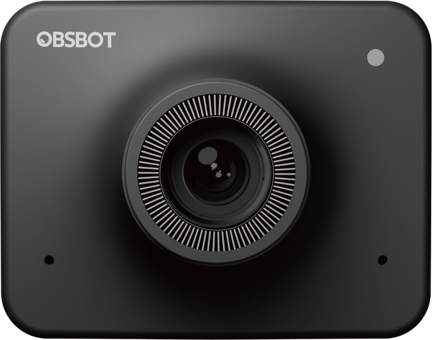
The Meet 1080P and Meet 4K share the published body dimensions and weight: 56 × 44 × 32 mm and 72 g without the mount, or 56 × 44 × 53 mm and 133 g with it. OBSBOT lists a foldable magnetic mount plus a UNC 1/4-20 tripod thread, but no tripod in the base package. The stated box pieces include the camera, cable, USB-A adapter, removable privacy shutter/cover, magnetic mount, storage bag, manual and warranty card. Verify the offer’s exact package; the official image shows the body, not the whole box.
The manufacturer’s April 30, 2026 notice lists Meet 1080P among models whose production ends May 1, 2026, with support through May 1, 2031. It says remaining units may sell through with no restock; that does not establish present stock or condition. This is an earlier model in the finder, omitted unless the visitor opts in to earlier products. Before choosing any remaining or second-hand unit, check the exact model, included cables and cover, seller terms and whether your host/app can use the mode you need.
Who should compare it?
Consider Meet 1080P when Full HD at 60 fps is sufficient and you value autofocus/manual control, camera-side microphones, adjustable field of view, a removable physical cover and a threaded mount. It is not a 4K alternative, and it has half the listed digital zoom range of the Meet 4K. Both editions share the same fixed-body format, USB-C connector with an unspecified data generation, dual-microphone hardware and software-dependent framing. Keep the full-HD and autofocus requirements selected, and do not relax an essential 4K or built-in-shutter choice just to make this earlier model appear as a match.
Key specifications
Key details at a glance
| Documented modes and host limits | Full HD reaches 60 fps in MJPEG/H.264; no 4K resolution is listed. The YUV 1080p entry is only 5 fps. |
|---|---|
| Focus system | Autofocus |
| Built-in microphone | Yes |
| Physical privacy shutter | No |
Use the exact model’s instructions for operating limits, supplied equipment and version differences.
Sources for this review
Sources for this assessment
- OBSBOT Meet First Gen U.S.-facing product and package selector
- OBSBOT Meet and Meet 4K field-by-field technical specification comparison
- OBSBOT Meet Series FAQ
- OBSBOT Meet 4K User Manual, English edition (shared Meet-series manual)
- OBSBOT Meet First Gen downloads and software support page
- OBSBOT Product Discontinuation Notice
- Official OBSBOT Meet 1080P camera-body image

Compare the features that affect your setup
Set essential video, focus, privacy and microphone requirements together; leave nonessential choices open.