
Your needs, this model
Does it fit your priorities?
Does MX Brio 705 for Business support 4K at 60 frames per second?
No 4K60 mode is documented. Logitech lists 4K at 30 fps and 1080p at 60 fps as separate modes. If 4K60 is a hard requirement, do not treat a 4K sensor label or 1080p60 support as a match; check the exact format your application offers.
Explore this need in the finder →Does the MX Brio 705 for Business have a physical camera cover?
Yes. Logitech specifies an integrated shutter operated by a dial around the lens ring. This is a physical lens cover; the reviewed source does not say that closing it mutes the built-in microphones, so confirm the audio input separately.
Explore this need in the finder →Can its built-in microphones be used for calls?
Logitech specifies two noise-reducing beamforming microphones. That confirms onboard microphone hardware, not an independently tested pickup range or sound quality; confirm the chosen application selects the webcam microphone and assess whether your room needs a separate headset or mic.
Explore this need in the finder →Can an IT team manage several MX Brio 705 for Business cameras remotely?
Logitech advertises device deployment and management through Logitech Sync. The datasheet footnote says Logi Tune must be downloaded on individual devices; verify that both tools are supported and approved in your organization before relying on remote management.
Is U.S. SKU 960-001529 documented as TAA-compliant?
The official U.S. page and datasheet identify the SKU and list several meeting-platform certifications, but the retained model sources do not state that this exact SKU is TAA-compliant. Do not infer procurement status from the business name or those certifications; ask the responsible buyer to verify the exact part number and purchasing route.
Explore this need in the finder →Who should consider the business edition?
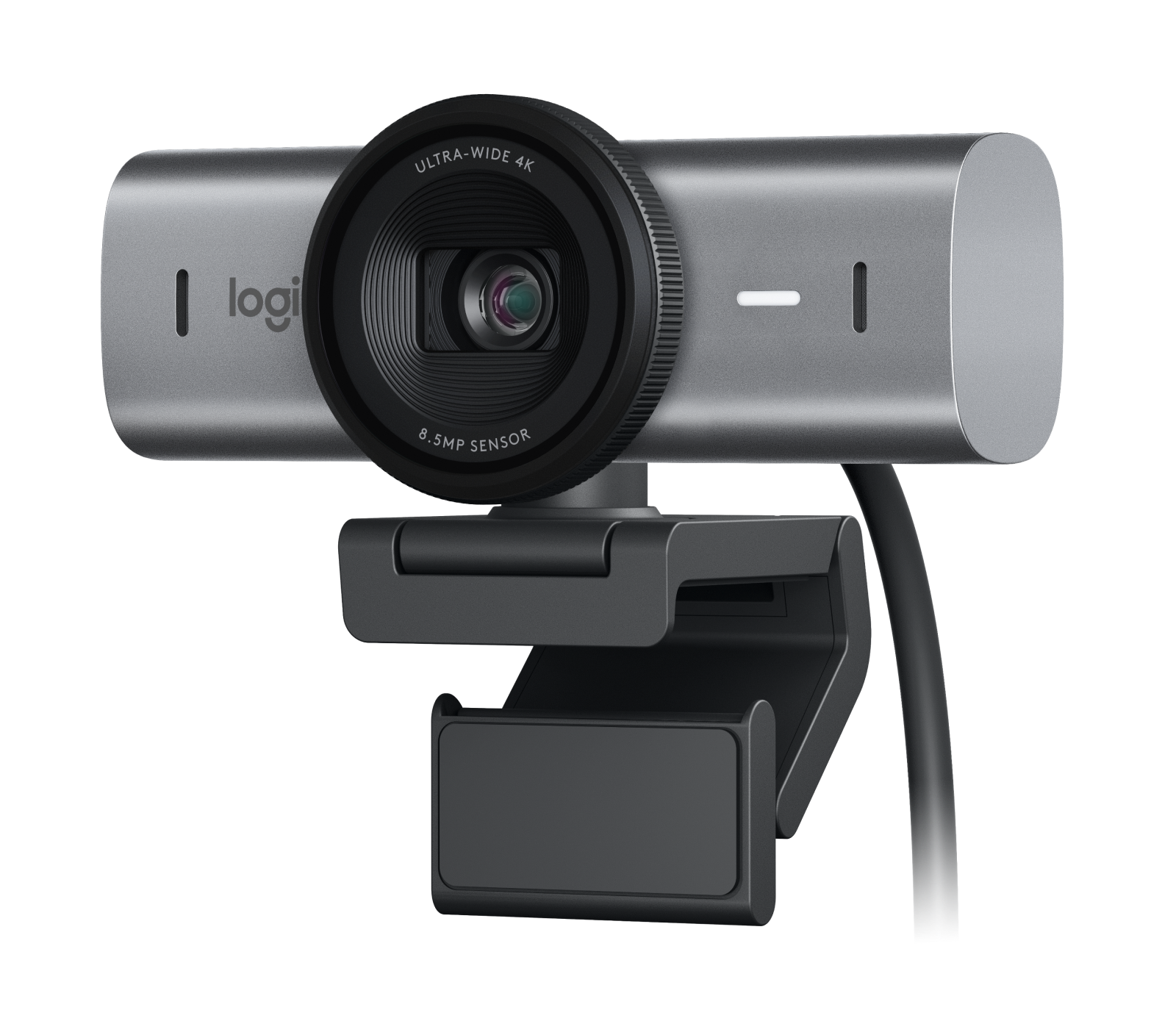
The MX Brio 705 for Business is a standalone webcam rather than a conference-room camera. Logitech’s U.S. business catalogue lists it as a webcam, and the exact Graphite product record identifies part number 960-001529. Its useful distinction is not a new high-frame-rate format: Logitech documents 4K at 30 frames per second and Full HD at 60, alongside autofocus, a built-in rotary shutter and two beamforming microphones. It adds business-specific management and security claims that matter when an organization has a supported deployment workflow.
This is a source-based assessment, not a hands-on review; image, sound, focus transitions and software were not tested. Logitech’s “clear” or “natural” wording is a manufacturer claim, not an independent result.
Good resolution limits, with one important distinction
The published modes include up to 3840 × 2160 at 30 fps, 1920 × 1080 at 60 fps and 1280 × 720 at 60 fps. That supports a practical distinction between a 4K recording or capture request and a smooth Full HD call: 4K60 is not documented. A monitor, meeting application, USB path and software setting also affect which mode can actually be selected; a sensor label alone does not guarantee the app will expose every advertised format.
The datasheet names an 8.5-megapixel Sony STARVIS sensor, 4× digital zoom and 65°, 78° and 90° diagonal fields of view. Logi Tune controls field of view and image settings. Check what fits in the chosen composition; these numbers do not establish independent image quality.
Host and software requirements
Logitech specifies a detachable USB-C 3.0 cable and recommends connecting the camera directly to a USB-C computer port. Its setup guidance cautions that a hub or extender must pass both power and video. Before buying, identify the actual port on the intended computer, confirm the cable reaches from that port to the mounting point, and check whether an adapter or dock preserves the required video and power path. The included cable is listed as 1.5 metres; Logitech does not list a separate power adapter in the box.
The business page lists Windows 10 or later, macOS 10.15 or later and ChromeOS. Logitech Tune is available for Windows and macOS, but not ChromeOS. That matters because the field-of-view controls, Show Mode and RightSight auto-framing are software-dependent. Logitech also says RightSight auto-framing is unavailable on computers with ARM processors. A buyer who only needs a standard USB webcam stream may have a simpler setup than a team expecting remote management, camera framing or consistent image profiles; confirm the particular application, host and management policy before ordering.
Focus, privacy and audio
The camera uses closed-loop autofocus with face-based technology. Logitech also lists manual focus in Logi Tune, so there is a software control path when autofocus is not wanted. The specification describes two noise-reducing beamforming microphones. This establishes that camera-side audio hardware exists; it does not establish pickup quality at your seating distance or in a noisy office, and the physical lens cover should not be treated as a microphone mute.
A rotary dial built into the lens ring closes the physical privacy shutter. That is a straightforward answer for buyers who specifically need a shutter attached to the camera rather than an accessory clip or a software privacy mode. It covers the lens; still check the activity indicator, computer permissions and the selected audio device when starting a call.
What separates it from a consumer MX Brio
Do not use the similar name to identify an offer. The 705 for Business is a distinct documented Graphite model and U.S. part number, 960-001529. Logitech’s consumer MX Brio listing uses other model names and part numbers. The published camera functions overlap in important ways, including 4K30, 1080p60, autofocus, a physical shutter and built-in microphones, but the material business case is different: Logitech advertises secure boot and remote device management through Logitech Sync, and specifies a three-year limited hardware warranty. The datasheet says Sync management requires Logi Tune to be downloaded on individual devices.
These sources do not establish that every component or retailer bundle is identical to a consumer MX Brio. Logitech also gives the business model an 82% minimum post-consumer-recycled-plastic claim and low-carbon aluminum housing; these are manufacturer claims, not an independent lifecycle comparison. “For Business” does not automatically mean a better image or a better fit.
Package, mounting and buying checks
The published box contents are the webcam, USB-C 3.0 cable, mounting clip with removable adapter and user documentation. The clip fits a monitor, LCD display or laptop, and its mounting system has a standard 1/4-inch thread. Logitech explicitly says a tripod is not included. Show Mode tilts the camera down to present a desk item; it is a manual webcam positioning workflow, not a separate overhead camera or document-scanning system.
For procurement, verify that the offer says MX Brio 705 for Business and gives U.S. part number 960-001529, not a consumer MX Brio or the separate Brio 4K. Logitech’s listed business certifications include Microsoft Teams, Zoom, Google Meet and Works With Chromebook; the retained model sources do not identify this SKU as TAA-compliant. Do not infer a procurement approval from the word “Business” or from those meeting-platform certifications. Ask the responsible buyer to confirm the exact SKU and purchasing route.
Bottom line
This edition is a considered candidate for a USB-C 3.0 desktop setup that needs 4K30 or 1080p60, autofocus, a physical shutter and built-in microphones, especially when Sync administration and the documented three-year warranty are useful. Its constraints are equally concrete: 4K tops out at 30 fps, several framing controls depend on Logi Tune for Windows or macOS, the cable and host path need checking, and a tripod is extra. If 4K60, TAA proof, ChromeOS-based Tune controls or a different mount package is essential, confirm those points before treating the model as a fit.
Key specifications
Key details at a glance
| Documented modes and host limits | Published modes include 4K30, 1080p60 and 720p60. Logitech specifies a detachable USB-C 3.0 cable and a compatible USB-C host path; no 4K60 mode is documented. |
|---|---|
| Focus system | Autofocus |
| Diagonal field of view | 90° |
| Built-in microphone | Yes |
| Physical privacy shutter | Yes |
Use the exact model’s instructions for operating limits, supplied equipment and version differences.
Sources for this review
Sources for this assessment
Compare the features that affect your setup
Set essential video, focus, privacy and microphone requirements together; leave nonessential choices open.