
Your needs, this model
Does it fit your priorities?
Does the PanaCast U30 meet a 4K minimum?
Jabra lists 4K camera resolution and UVC 1.5 on its USB video bar, so it matches a resolution-only 4K requirement. The data sheet does not give a frame rate or UVC mode matrix, so this does not prove 4K30, 4K60 or 1080p60.
Explore this need in the finder →Can the U30 supply room audio to a laptop-hosted meeting?
Jabra describes single-cable BYOD and lists six microphones and an integrated speaker. These are manufacturer hardware statements, not an audio test; check that the laptop application selects the U30's audio devices.
Explore this need in the finder →Is the U30 privacy cover a built-in shutter?
No built-in shutter is documented. Jabra lists a removable cover and its manual says to cover the lenses while idle and remove it while streaming; that accessory does not satisfy the finder’s built-in physical shutter requirement.
Explore this need in the finder →Does U.S. SKU 8800-232 meet a strict TAA request?
The inspected 2026 Jabra TAA-compliant-solutions sheet does not name U30 or 8800-232. The exact SKU is not credited as TAA compliant; confirm current manufacturer documentation and purchasing approval.
Explore this need in the finder →Is the U30 a compact desk webcam?
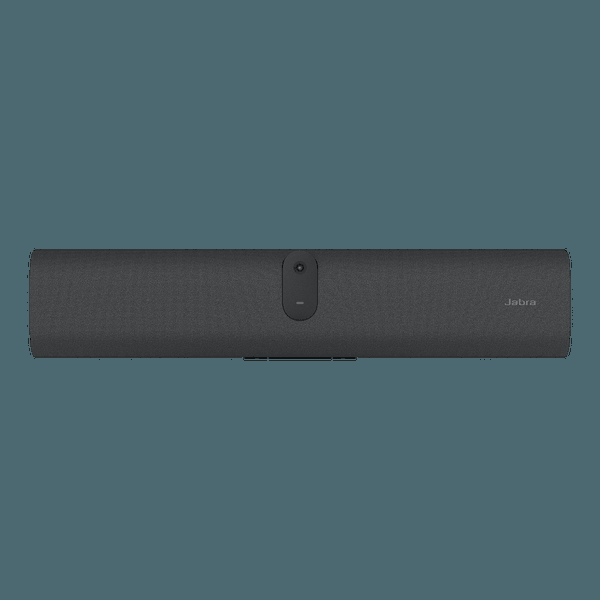
No. It is a 529 mm-wide, 1.51 kg room video bar that uses a supplied power adapter and a separate mounting/display plan; it is assessed as a small-room BYOD camera, not a monitor-clip webcam.
Explore this need in the finder →Jabra PanaCast U30 is better understood as a small-room video bar than as a personal desk webcam. Its U.S. item 8800-232 is listed as a USB video bar for plug-and-play BYOD, with one camera, six microphones and an integrated speaker. Jabra specifies 4K camera resolution but does not publish a frame rate for that computer-camera route in the sources reviewed. This is a source-based assessment, not a hands-on evaluation of room audio, image quality, tracking or installation.
Read the 4K specification narrowly
The North American data sheet identifies SKU 8800-232 and lists a 4K camera resolution, USB 3.0 support and UVC 1.5. It does not pair the 4K figure with a frame rate or name the UVC formats exposed by a host application. The U30 can therefore answer a resolution-only 4K requirement, but this record does not establish 4K30, 4K60 or 1080p60. Do not derive a call mode from the sensor-resolution field or from the room system's video-processing features.
Jabra calls the U30 a USB video bar with single-cable BYOD. The included 1.8 m USB-C-to-USB-C 3.2 Gen 1 cable links a laptop to the bar; the product sheet lists USB 2.0 and USB 3.0 and a UVC version, but gives no mode matrix for the slower USB route. Use the documented USB 3-class path for this 4K-resolution assessment and confirm which modes the intended computer and meeting app expose. The camera's intelligent framing features are not proof of optical autofocus, and the reviewed sources leave the lens focus type unspecified.
Plan a room connection, not just a webcam port
This is a powered room appliance, not a bus-powered monitor clip. Jabra lists a 12 V power supply, a regional AC cable, a wall mount and the USB-C cable in the model-level box contents. The bar is about 529 mm wide, 108 mm high and 65 mm deep, with a listed unit weight of 1.51 kg. A wall mount is in the listed package; the data sheet says a table stand is sold separately, while VESA and table options are listed as alternatives. Check the wall, display or furniture arrangement before treating this as a simple desktop camera.
For camera use, BYOD means the laptop runs the meeting and connects to the bar by USB-C. Jabra also supports single-cable sharing of laptop content to the room display, but its note says the laptop USB-C port must support DisplayPort Alt Mode for that sharing function; a USB 2.0 cable cannot carry that mode. That is a content-sharing limitation, not a reason to assume the UVC camera can deliver an undocumented frame rate. If your computer lacks the required Alt Mode, Jabra describes a separate HDMI content path; an HDMI cable is not in the published package list.
Room audio is part of the match, not a tested result
The U30 data sheet lists six microphones, one speaker and full-duplex room audio. Its BYOD framing is designed for laptop-hosted meetings, so the bar can serve as both camera and audio hardware in that workflow. Those are manufacturer specifications; there is no independent speech-intelligibility, echo or pickup test here. The listed microphone sensitivity and frequency range describe the manufacturer's published fields, not how well the bar performs in a reflective room, with a distant participant or beside an air vent. Check the selected camera and microphone devices in the actual meeting application.
Jabra also describes dynamic composition, a virtual director, intelligent zoom and room-space controls. These features may alter the crop or camera view, but the manuals do not establish how a particular app exposes every mode or the resulting frame rate. The room setup requires an outlet, cable route and a compatible screen for the video-bar workflow; it is a materially different installation from a webcam clipped above one laptop.
The supplied cover is removable, not a built-in shutter
Jabra lists a privacy cover among the box contents, and the manual says to put it over the camera lenses when the bar is idle and remove it while streaming to avoid flicker. That is a physical privacy accessory, but the reviewed documentation does not describe it as an integrated shutter built into the camera. It therefore does not satisfy this guide's strict built-in-shutter filter. If a fixed, attached lens block is essential, check another assessed model rather than assuming the removable cover stays on the bar during normal use.
What to verify before choosing a room bar
Consider SKU 8800-232 when a small meeting room needs a USB-C BYOD camera with documented 4K resolution, room microphones and an integrated speaker, and the installer can supply mains power and a suitable mount. Look elsewhere if you require a documented 1080p60 or 4K60 mode, a published UVC mode table, a known focus system or a built-in physical shutter. The app, laptop and operating-system combination still needs checking; the U30 system's Android 13 specification does not mean the laptop's meeting software runs on the camera bar.
At purchase time, verify the exact U.S. part number, included 1.8 m USB-C cable, regional power lead, wall mount and seller-specific carton. Budget separately for a table stand, longer cable or HDMI lead if the room design needs one. Confirm whether the laptop's USB-C port supports the data and DisplayPort Alt Mode functions required for your intended setup. No price, current stock, seller package condition, image-quality result, room-audio result or procurement approval is claimed here.
Key specifications
Key details at a glance
| Documented modes and host limits | A 4K camera resolution is listed, but no UVC frame rate or output mode matrix is given. Do not credit 1080p60 or 4K60. |
|---|---|
| Diagonal field of view | 132° |
| Built-in microphone | Yes |
| Physical privacy shutter | No |
Use the exact model’s instructions for operating limits, supplied equipment and version differences.
Sources for this review
Sources for this assessment
- Jabra Video Conferencing Cameras — small-room video bar category
- Jabra PanaCast U30 Product Overview
- Jabra PanaCast U30 U.S. Support — item 8800-232, model VSM060
- Jabra PanaCast U30 Data Sheet (English — North America), Revision A
- Jabra PanaCast U30 User Manual, English Revision A
- Jabra PanaCast U30 Administrator Guide, English Revision A
- Jabra TAA Compliant Solutions, 2026
- Jabra Warranty+ Service to Product Guide, Effective May 2026
- PanaCast U30 body photograph embedded in the North American data sheet
Compare the features that affect your setup
Set essential video, focus, privacy and microphone requirements together; leave nonessential choices open.