
Your needs, this model
Does it fit your priorities?
Does PanaCast Room Kit meet a 4K computer-webcam requirement?
No supported conventional 3840 × 2160 BYOD/UVC mode is established. Jabra lists the bar's panoramic camera image at 3840 × 1080, and no computer camera frame-size/frame-rate table was found. The extra Cam L1 is a component, not proof of an external laptop feed.
Explore this need in the finder →Does it provide 1080p60 or 4K60 webcam output?
The reviewed PanaCast 55 BYOD sources publish no USB camera resolution/frame-rate matrix. Neither 1080p60 nor 4K60 is credited.
Explore this need in the finder →Is focus fixed or autofocus for the camera available to the laptop?
The PanaCast 55 BYOD bar focus is unclassified. Although the separate Cam L1 component sheet says fixed-focus, availability of that feed to the laptop is not established, so neither finder focus option is credited.
Explore this need in the finder →Does the bar have a built-in physical shutter?
No. The kit lists a removable privacy cover with sensor; no integrated physical shutter is documented.
Explore this need in the finder →Is built-in microphone hardware documented for the laptop path?
Yes. The manual says the BYOD meeting uses the PanaCast 55 VBS bar microphones and speakers; the bar specifies eight microphones. The included extension SpeakerMic's use by the external BYOD host is not established, and no audio test is claimed.
Explore this need in the finder →Is North American item 9000-232 explicitly TAA compliant?
No reviewed source identifies this exact part as TAA compliant, so no TAA match is assigned.
Explore this need in the finder →Is it an earlier model?
The reviewed official package data sheet is a 2026 English Rev A document and identifies the item as a current reference, not an earlier model. That does not establish active seller stock.
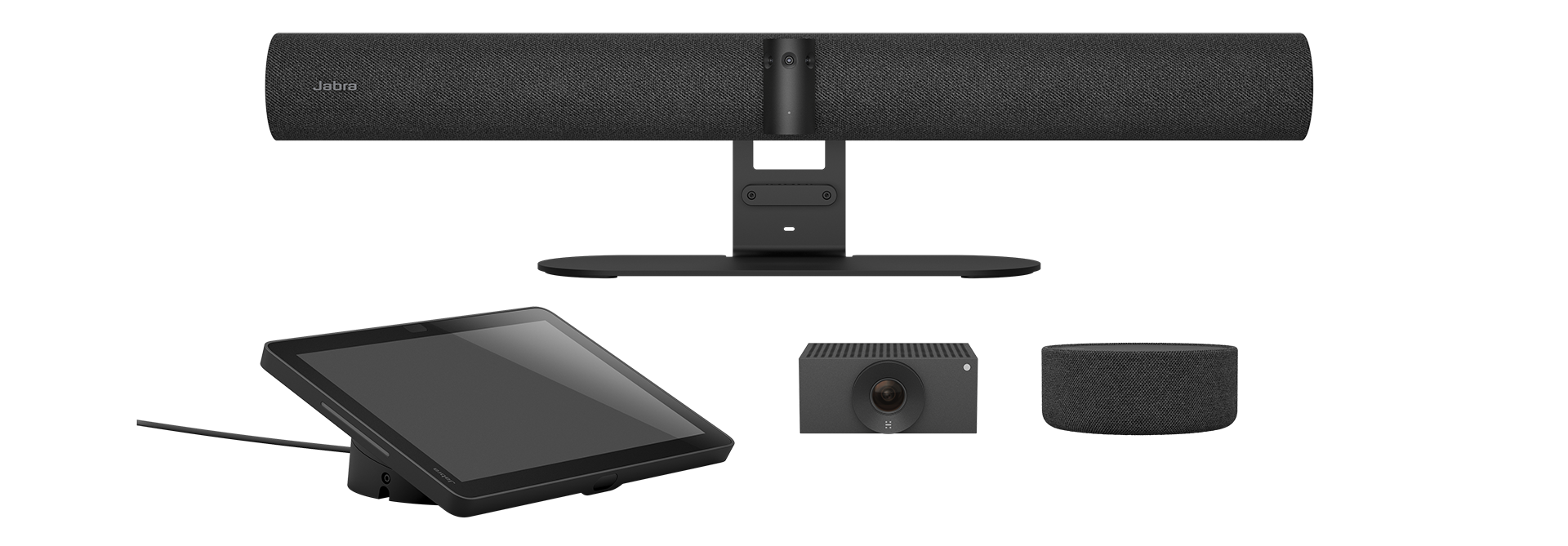
Explore this need in the finder →The Jabra PanaCast Room Kit, North American item 9000-232, is a large-room conferencing package built around the PanaCast 55 VBS bar. Jabra’s 2026 data sheet names the other two main components: a PanaCast SpeakerMic and one Huddly Cam L1. This is not the same thing as buying the PanaCast 55 VBS by itself, nor does the bundle turn every included camera into a separately verified laptop webcam. This assessment is based on Jabra’s model materials and manual; I did not install or test the system.
One bar, an audio extension, and a separate camera
The package is a room system, not a webcam with a clip. The PanaCast 55 VBS is a 730 mm-wide, mains-powered bar containing a three-camera panoramic array, eight beamforming microphones and four speakers. The data sheet gives a 3840 × 1080 pixel image, 180-degree horizontal by 54-degree vertical field of view, and up to 6× lossless digital zoom. A PanaCast SpeakerMic adds table-side audio hardware; Jabra’s published coverage figure rises from up to 7 metres for the bar to up to 11 metres with SpeakerMic. Those are manufacturer ratings, not a measured guarantee for a particular room, table or seating plan.
The remaining camera is a Huddly Cam L1. The component data sheet calls it a fixed-focus digital PTZ unit with a 1920 × 1080 resolution and lists USB-C through an adapter, USB 3 and Ethernet. That describes the component, not the full kit’s laptop-camera output. The reviewed Jabra sources do not establish that the Cam L1 feed appears in a personal computer’s BYOD meeting session, so this review does not count it as a confirmed second camera endpoint for an external host.
BYOD is a real path, but its camera mode is not specified
Jabra documents a BYOD mode for the PanaCast 55 VBS. An administrator must enable it; a personal computer then connects to the bar over USB-C and uses the bar’s camera, microphones and speakers. The manual depicts the USB-C host lead as not supplied. HDMI is a separate route for showing computer content on a room display, not a camera connection or proof of a particular USB video mode. The administrator guide also warns that Intelligent Meeting Space does not work in BYOD mode. In other words, a host-computer session is not necessarily the same feature set as the system’s native room mode.
The wide 3840 × 1080 panorama is not a conventional 3840 × 2160 UHD frame, and neither the room-kit data sheet nor the reviewed BYOD instructions provide a UVC resolution-and-frame-rate table. I therefore assign no 4K, 1080p60 or 4K60 webcam mode. The 4K display specification, USB 2.0/3.0 support, AI framing language and 1080p Cam L1 component rating do not fill that gap. Focus for the PanaCast 55 host-camera endpoint is also unclassified; the L1 component’s fixed-focus specification does not establish the bar’s focus system or change the BYOD output evidence.
Large-room infrastructure brings installation checks
Jabra’s package sheet lists the PanaCast bar, power supply, wall mount, Control IP touchscreen, removable privacy cover, cable-compartment parts, HDMI lead and regional power lead as bar contents. The master kit list adds the SpeakerMic and Huddly L1. The room bar needs mains power and a display and mount plan. The SpeakerMic uses a connection path and cable that should be checked against the furniture layout; its listed 0.5 m lead is not a claim that every table installation is ready without other wiring.
There is a privacy cover, not a documented built-in physical shutter. Nothing in the reviewed manual establishes that closing the cover mutes the room microphones. Nor does the presence of eight bar microphones, four extra SpeakerMic microphones, or a maker-rated coverage distance establish intelligibility at every seat. Confirm the meeting platform, network and room-control design, camera placement, display, mounting hardware, USB-C BYOD cable and exact delivered carton before planning around it.
How it differs from Room Kit Multi
Room Kit Multi is a separate North American package, item 9010-232, with three Huddly Crew cameras rather than one Cam L1. That difference affects camera quantity, cabling, wall mounts, power and installation. Both kits contain the PanaCast 55 VBS and SpeakerMic, and both inherit the same uncertainty about the BYOD camera-mode matrix and which extension feeds a laptop can use. The packages should not be merged simply because the core bar is shared.
Who should shortlist it
Consider item 9000-232 if a room project calls for a PanaCast 55 VBS bar, table-side audio extension and one additional Huddly camera in a coordinated large-room kit. It is a poor match for someone seeking a simple desktop webcam or who requires a published laptop capture mode, a confirmed multi-camera BYOD feed, a built-in shutter or a known fixed/autofocus classification. The North American manufacturer part is documented, but this research did not verify an active U.S. seller offer, stock, price, order condition, TAA status or exact carton from a seller. Check those details and the BYOD cable plan before purchase; no hands-on result is claimed here.
Key specifications
Key details at a glance
| Documented modes and host limits | No published PanaCast 55 VBS computer BYOD/UVC frame-size and frame-rate matrix in reviewed manufacturer sources. |
|---|---|
| Built-in microphone | Yes |
| Physical privacy shutter | No |
Use the exact model’s instructions for operating limits, supplied equipment and version differences.
Sources for this review
Sources for this assessment
- Jabra Large Room Video Conferencing Cameras & Solutions
- Jabra PanaCast Room Kit product page
- Jabra PanaCast Room Kit support identity
- Jabra PanaCast Room Kit data sheet, English Rev A
- Jabra PanaCast 55 VBS User Manual, English Rev A
- Jabra PanaCast 55 VBS Administrator Guide, Rev A
- Huddly Cam L1 data sheet, North America Rev B
- Jabra official PanaCast Room Kit image

Compare the features that affect your setup
Set essential video, focus, privacy and microphone requirements together; leave nonessential choices open.