
Your needs, this model
Does it fit your priorities?
Is the Room System simply another PanaCast 50 camera package?
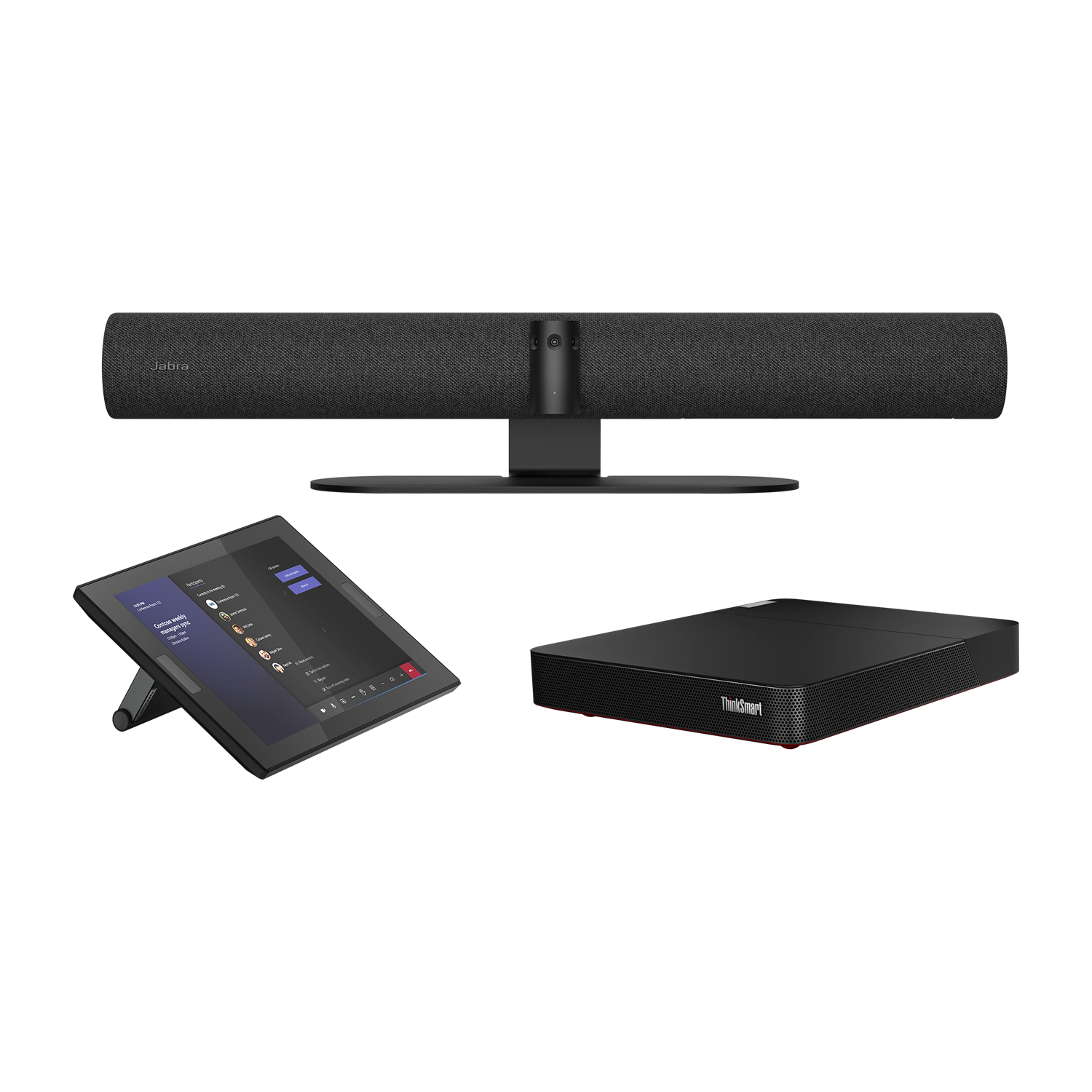
No. It adds a Lenovo ThinkSmart Core computer and touchscreen controller to the PanaCast 50 bar. It is different from PanaCast 50 VBS, which is Android-based and includes Jabra PanaCast Control.
Explore this need in the finder →Does this full system include microphones for a room call?
Yes. The PanaCast 50 bar in the package has eight built-in microphones and four speakers. The source lists the hardware; it does not test room pickup or guarantee every seat's audio.
Explore this need in the finder →Does the Room System meet a conventional 4K USB webcam requirement?
Jabra lists a 3840 × 1080 panoramic image at 30 fps, not a standard 3840 × 2160 USB output matrix. The 4K finder option is not credited, and 1080p60 or 4K60 are not established.
Explore this need in the finder →What is different between the US system parts?
Jabra's North American sheet lists 8601-332 for Microsoft Teams Rooms and 8601-432 for Zoom Rooms. Check the exact platform edition, Lenovo computer/controller, power plug and seller carton.
Explore this need in the finder →Can the bar be reused as a USB camera outside the Lenovo room system?
The package includes a two-metre USB 3.0 USB-C-to-A lead for the PanaCast 50 bar, and Jabra lists the camera as Windows/macOS compatible. Confirm the actual host/app workflow first; the reviewed documents do not give its full UVC resolution/frame-rate matrix.
Explore this need in the finder →The Jabra PanaCast 50 Room System is a complete Windows-based meeting-room bundle built around the PanaCast 50 camera bar, a Lenovo ThinkSmart Core computer and a Lenovo touch controller. It is not simply the PanaCast 50 video bar with a different label. The North American technical sheet lists Microsoft Teams Rooms part 8601-332 and Zoom Rooms part 8601-432. Those platform editions share the named camera-and-computer package, but the preloaded meeting software differs. Jabra’s support materials mark the Microsoft Room System documents discontinued; this review treats the system as an earlier product reference and makes no claim about current stock or a seller’s delivered bundle.
What comes in the room-system box
The manufacturer’s specification lists a PanaCast 50 bar, power supply, wall mount, a two-metre USB-C-to-USB-A USB 3.0 cable and a privacy cover. The Lenovo section lists the ThinkSmart Core computing device, ThinkSmart Controller touchscreen, power adapter, mounting bracket and a ten-metre USB-C cable. The system is preloaded for Microsoft Teams Rooms or Zoom Rooms, depending on the part. This is a substantial fixed-room installation with two computing devices and cabling to plan, not a simple camera purchase. Jabra’s lifestyle photograph also shows the controller and ThinkSmart Core alongside the bar, which helps identify the bundle but does not replace checking the exact regional package list.
Jabra specifies three cameras, each described as a 13-megapixel module, a 180-degree horizontal and 54-degree vertical view, up to six-times lossless digital zoom, eight microphones and four speakers. Its published output is Panoramic-4K: 3840 × 1080 at 30 fps. That unusually wide format is not conventional UHD 3840 × 2160, despite the maker’s “4K” branding. The bar’s software features—Intelligent Zoom, dynamic composition and Virtual Director—may help frame an in-room group, but no external test was performed and no software feature turns the published panoramic dimensions into an unlisted PC webcam mode.
Room-system operation versus reusing the camera
In its intended configuration, the ThinkSmart Core and touch controller run the chosen meeting-room platform so people can join from the room instead of bringing a laptop to every call. Jabra’s system specifications describe the camera bar itself as Windows/macOS compatible, and its package includes the two-metre USB 3.0 cable; that creates a separate potential computer-camera path if an owner is deliberately reusing the camera outside the bundled room-PC workflow. The camera still needs power. Confirm the exact host mode, cable role, operating-system support and app behavior before repurposing it. The docs reviewed here do not provide a full UVC resolution/frame-rate matrix, so the 3840 × 1080 @30 room panorama is recorded as a product specification but not a conventional finder match for 4K, 1080p60 or 4K60.
Do not assume the included ten-metre USB-C cable is a general laptop-camera cable; Jabra lists it in the Lenovo system items. Likewise, the bar’s separate two-metre USB lead is the documented USB 3.0 cable between the camera and a computer. This distinction is useful when auditing the bundle or planning a room: labeled cables can serve different components. Check which unit powers the display, what network connection is required by the room PC, and who will maintain the Teams Rooms or Zoom Rooms application and updates.
Camera, audio and privacy tradeoffs
The PanaCast 50 has integrated eight-microphone audio and four speakers, so the room bundle does not require a separate microphone just to provide basic in-room audio hardware. Jabra specifies the microphone array for a room up to 4.5 by 6 metres in the tech sheet. That remains a manufacturer rating rather than an independent test of room pickup; table geometry, reverberation, distance and ambient noise are still important. This kit is consequently most defensible when a buyer needs a managed room-computer system as well as a wide camera, not when the only need is a camera with an attached USB cable.
Its privacy cover is removable, not an integrated shutter. No reviewed manufacturer source classifies the lens as fixed-focus or autofocus, and exact TAA compliance is not explicitly stated for the named U.S. room-system SKUs. A physical lens cover does not prove the microphones are muted. The finder therefore does not credit the Room System for a built-in shutter, known focus type or strict TAA requirement. Buyers should assess camera privacy, audio mute policy and procurement compliance separately.
When it makes sense
This system may suit an organization already standardizing on one of its certified room platforms, with a medium room, permanent display and IT staff who can install and administer the ThinkSmart Core. The included computer and controller can be valuable if the organization wants a consistent room experience; they are needless cost and complexity for a person who only wants to attach a webcam to a laptop. It is also not interchangeable with PanaCast 50 VBS: that Android room appliance has a Jabra Control touchscreen, whereas this Room System uses a Lenovo room computer/controller. Nor is it the ordinary PanaCast 50 standalone bar, even though that bar is part of this kit.
A newer PanaCast 50 Room System 2 is a separate product and must not be substituted into this review. Before considering a legacy Room System unit, confirm whether it is the Teams or Zoom edition, the exact 8601-332 or 8601-432 part, the Lenovo computer and touch controller, the correct regional power pack, cable contents, software support, seller condition, warranty and returns. Use the camera as a computer peripheral only after verifying the intended connection independently. This is a document-based comparison, not a hands-on trial or recommendation based on price or current availability.
Key specifications
Key details at a glance
| Documented modes and host limits | The 30 fps figure describes the PanaCast 50 panorama, not an unlisted UHD or 60 fps USB camera mode. |
|---|---|
| Built-in microphone | Yes |
| Physical privacy shutter | No |
Use the exact model’s instructions for operating limits, supplied equipment and version differences.
Sources for this review
Sources for this assessment
- Jabra Medium Room Video Conferencing Cameras & Solutions
- Jabra PanaCast 50 Room System U.S. product page
- Jabra PanaCast 50 Room System Technical Specifications, 18 Aug 2025
- Jabra PanaCast 50 Room System 2 Technical Specifications, IP Controller version
- Jabra PanaCast 50 Room System support record
- Official Jabra PanaCast 50 Room System bundle image

Compare the features that affect your setup
Set essential video, focus, privacy and microphone requirements together; leave nonessential choices open.