
Your needs, this model
Does it fit your priorities?
Can the ONE RS 1-Inch 360 Edition be used as a computer webcam?
Yes. The exact-edition support FAQ confirms Webcam mode and the product page describes a 360 split-screen call view. Setup steps, cable, host-app compatibility and numeric USB output remain unspecified.
Explore this need in the finder →Does the ONE RS 1-Inch 360 Edition meet a numeric video mode requirement?
No. 6K/30 is a camera-recording specification. The Webcam FAQ confirms use but gives no webcam resolution, frame rate or codec.
Explore this need in the finder →Can its camera microphone or shutter be assumed for computer calls?
No. The sources do not verify USB-call microphone exposure or a built-in physical shutter. Plan separate audio and a cover until the exact host behavior is confirmed.
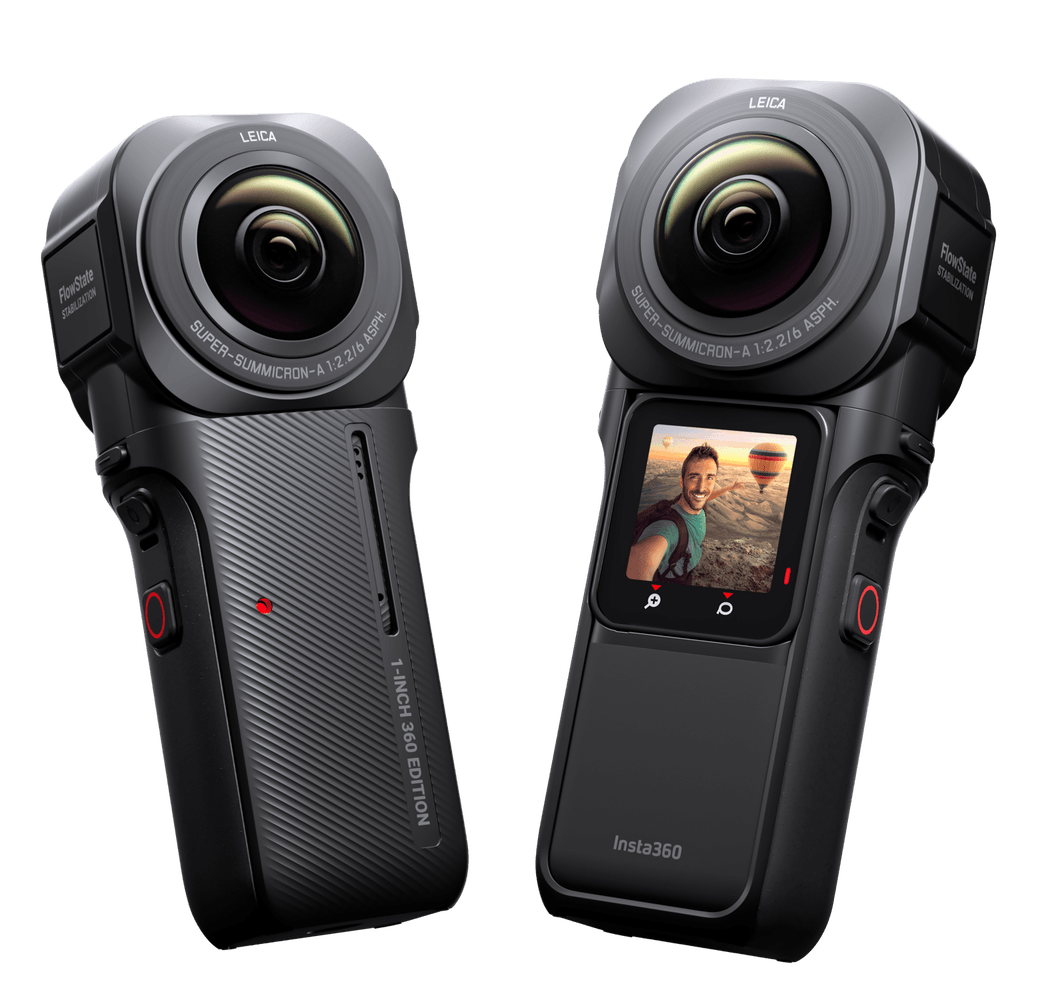
Explore this need in the finder →The ONE RS 1-Inch 360 Edition is a distinct vertical 360-camera assembly, not another package name for the Twin Edition’s conventional 360 lens. Insta360’s support FAQ explicitly confirms that the 1-Inch 360 Edition supports webcam mode, and its product page describes calls as a 360 split-screen view. That is meaningful mode-specific evidence for computer-camera use. It does not, however, establish a USB resolution, frame rate, codec, host software list, or cable requirement.
A different physical configuration
The exact U.S. model is CINRSGP/D. B&H’s U.S. listing identifies that model and describes a package with the 1-Inch 360 lens, RS Core, dedicated vertical battery base, and matching mounting bracket. Insta360 explains that this lens must be assembled vertically and requires the ONE RS vertical battery base and bracket; the ordinary horizontal base is not compatible with it. Those are not cosmetic differences. A buyer should confirm that the core, dedicated battery base, bracket, lens cap, and other necessary items are actually included and in usable condition in the precise seller package. Amazon’s U.S. detail page identifies model CINRSGP/D, but its item details do not promise a complete set of components for every offer.
The manufacturer compares this lens with the Twin Edition 360 lens: the 1-Inch 360 version has two 1-inch sensors, produces 6K 360 recording, and is assembled vertically, while the Twin Edition’s 360 lens records 5.7K and is assembled horizontally. The product page separately states 239 g and 62 minutes in its 6K/30 lab-tested recording context. Those figures describe the complete camera or recording routine as presented by the manufacturer, not the USB webcam feed, desk footprint, or run time in a call.
The webcam view and its limit
For meeting use, the exact 1-Inch 360 product page says that ONE RS captures everything in 360 split-screen. The dedicated FAQ answers yes to the question of webcam-mode support. This differentiates it from a single forward-facing wide-angle setup: the advertised computer-call use is an immersive view that can show more of the surrounding space. That may be useful for a small group or a shared tabletop, but a split view is not the same as a conventional single-person head-and-shoulders composition. The page does not establish an in-webcam crop, one-side-only view, or control for reframing the USB stream, so do not assume that editing options for saved 360 footage also apply during a call.
The normal 6K/30 and 5.7K/30 figures in the camera specifications are recording modes. They do not answer whether an app receives a particular resolution or frame rate in Webcam mode. The reviewed English manufacturer sources provide no USB webcam mode matrix or codec statement. As a result, this product is not a verified 4K, 1080p60, or 6K webcam match. Confirm the current instructions and the behavior of the exact host application before a call-critical purchase.
Use, audio, and privacy checks
The official ONE RS computer-connection tutorial describes U-Disk mode for accessing camera files; it is not a Webcam tutorial. The separate Webcam FAQ confirms this 1-Inch edition’s feature but does not give a menu sequence, cable speed, supported operating-system list, or meeting-app matrix. That gap makes setup verification particularly important if the intended host is a managed work computer or a specific conferencing client.
The camera has a Core and recording-oriented microphone hardware, but the material reviewed does not confirm that any of its microphones become a computer-call audio input. Focus behavior for the Webcam stream, a built-in physical privacy shutter, and exact-model TAA status are likewise unknown. If audio is important, plan on a separate microphone until the host’s device list confirms otherwise. If privacy matters, use a separate physical lens cover or disconnect the camera; no built-in shutter has been documented for this edition.
Who it suits—and who should look elsewhere
This edition suits someone who has a concrete use for a 360 split-screen computer view and also values a 1-Inch 360 capture system. Its low-light marketing and 6K recording advantage relate to the 360 camera itself, not to a proven improvement in USB call quality. It is not the straightforward choice for a single-speaker presentation, a buyer who requires quantified live video modes, or someone who wants a compact monitor-mounted camera. The vertical battery and frame arrangement also deserves more desk-position planning than a standard clip-on webcam.
Compared with the ONE RS Twin Edition, the 1-Inch edition trades the Twin kit’s horizontal 4K Boost/360 pairing for a dedicated vertical 1-Inch 360 setup and a manufacturer-described split-screen call view. Compared with the ONE RS 4K Edition, it is more specialized toward 360 capture rather than conventional wide-angle action footage. Package compatibility is exact: the vertical base and bracket belong to this assembly and should not be assumed interchangeable with the horizontal arrangement.
Bottom line
The ONE RS 1-Inch 360 Edition is an unusual but genuine webcam-capable camera. It stands out because Insta360 explicitly documents the webcam feature and 360 split-screen call perspective, not because its 6K recording mode proves a 6K webcam stream. Consider it when the 360 view and the separately documented camera workflow are valuable, and verify the dedicated vertical components. Choose a purpose-built desk webcam instead if you need a predictable live-output format, standard framing, verified USB audio, or integrated privacy controls.
Key specifications
Key details at a glance
| Documented modes and host limits | 6K/30 is a camera-recording value. Webcam support and a 360 split-screen view are confirmed, but numeric USB Webcam output is not published. |
|---|
Use the exact model’s instructions for operating limits, supplied equipment and version differences.
Sources for this review
Sources for this assessment

Compare the features that affect your setup
Set essential video, focus, privacy and microphone requirements together; leave nonessential choices open.