
Your needs, this model
Does it fit your priorities?
Was Facecam Pro a 4K60 webcam?
Yes. Elgato lists 2160p60 and states that output at 4K60 can be H.264 or MJPEG. Its Quick Start Guide requires direct USB 3.0 at a minimum transfer rate of 5 Gbit/s; that source does not document USB 2.0 fallback.
Did the package supply a microphone?
No. Elgato's own Facecam Pro FAQ says there is no built-in microphone. A separate headset or microphone would have been needed for an audio path.
Was autofocus available, and how close could it focus?
Elgato lists a premium autofocus lens with a 10 cm-to-infinity focus range and describes both manual and automatic focus control in Camera Hub. This is a published specification, not an independent close-focus test.
Can an existing unit use a USB hub or USB 2.0 port?
The Quick Start Guide instructs users to connect directly to USB 3.0 at 5 Gbit/s or better and not use a USB hub. The reviewed support evidence does not establish a USB 2.0 mode, so do not assume one.
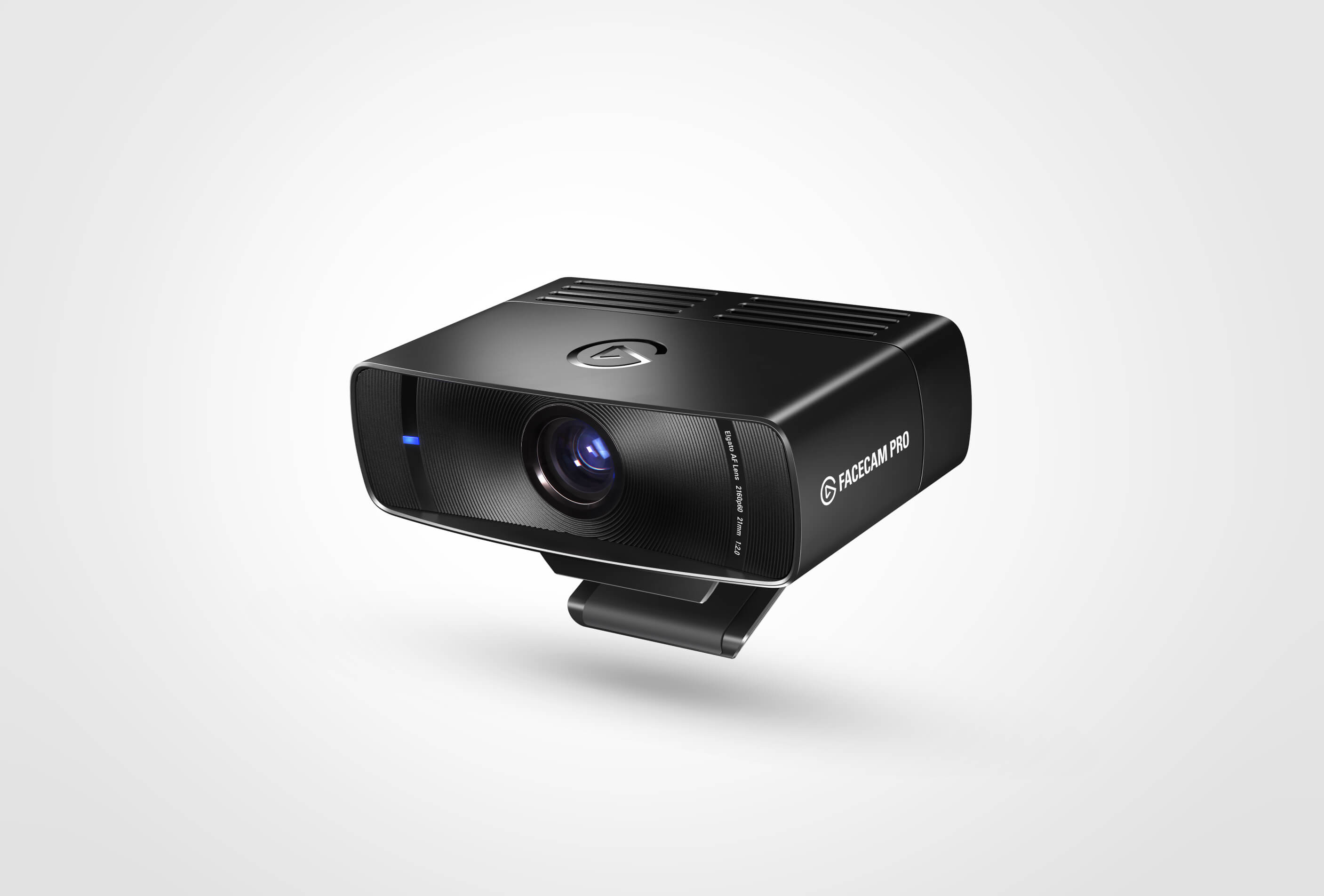
Facecam Pro is a discontinued model kept here for identification and comparison, not as a recommendation to buy a current retail offer. Elgato’s product page still documents a serious 4K60 webcam: it lists 2160p60, 2160p30, 1080p60, 1080p30, 720p60 and 720p30, along with an autofocus lens, manual focus control and a 90-degree field of view. The product page also states that Facecam Pro has been discontinued. No claim about remaining stock, used-market quality or price follows from those specifications.
A 4K camera with both automatic and manual focus
The most noticeable distinction from Elgato’s current Facecam 4K is focus. Facecam Pro’s Premium Autofocus Lens is specified from 10 cm to infinity, and the product page describes both automatic focus and the ability to manually lock focus. That flexibility can support a creator who alternates between a face and an object close to the camera. It also creates another setting to check: autofocus behavior, focus distance and manual controls depend on Camera Hub and the application’s intended workflow. I have not tested how quickly or reliably it changes focus.
Elgato lists a 1/1.8-inch Sony STARVIS CMOS sensor, 21 mm full-frame-equivalent focal length, f/2.0 aperture, 90-degree field of view, 116 × 38 × 79 mm body and 240 g weight without mount. These are useful for desk planning, but they do not prove that the camera will perform better in a particular room. A wide field of view can include more of a small room or group; it can also expose more background than a close crop. The larger camera body and its ventilation openings deserve space on a crowded monitor. Its guide specifically warns not to cover the vents because doing so may cause overheating.
USB and formats are hard requirements
The Quick Start Guide says to connect Facecam Pro directly to a USB 3.0 port with a minimum transfer rate of 5 Gbit/s or better, and not to use a USB hub. The supplied package lists a USB-C-to-USB-C cable at 180 cm. For a USB-C-to-USB-A alternative, the guide calls for 5 Gbit/s data transfer and 7.5 watts of power delivery. A port that merely fits the plug is not enough. The reviewed sources do not document USB 2.0 fallback, so this assessment does not assume one.
Elgato describes real-time 4K60 output in H.264 or MJPEG. The source materials do not supply a complete resolution-by-format table for every listed mode, so the comparison should not infer that each resolution has the same codec choices or that an application exposes every format. Check the exact capture mode inside your intended software. For a machine with only USB 2.0 or a hub-based desk route, the manual is a reason to stop and confirm compatibility rather than improvise.
Controls and audio needs beyond the lens
Camera Hub provides manual and automatic exposure, focus controls and pan, tilt and zoom effects. Its flash-memory feature is described as retaining settings across restarts or computer changes. These are configuration capabilities, not proof of a particular color, noise level, tracking result or crop quality. A creator may value having shutter speed and ISO close at hand; a user who wants an uncomplicated meeting camera may not want another application or a steeper setup path.
Facecam Pro has no built-in microphone according to Elgato’s own product FAQ. Plan a separate microphone or headset if audio is necessary. The product package lists a mount with a 1/4-inch thread, cable and quick guide, but does not establish a built-in privacy shutter. Treat that feature as unconfirmed rather than assuming a lens cover is included.
How it differs from Facecam 4K—and why lifecycle changes the decision
Both this model and Facecam 4K advertise 4K60 capture, but their documented routes differ. Facecam Pro emphasizes autofocus and manual focus and specifies USB 3.0 at 5 Gbit/s or higher; Facecam 4K is fixed focus, supports a 49 mm filter and describes 4K60 as MJPG-only with 4K30 available in NV12 or MJPG. For someone choosing a new camera, the lifecycle evidence is decisive: Elgato’s current Facecam Pro page says the product has been discontinued, while Facecam 4K and Facecam Neo have current US product pages. A buyer considering an existing or secondhand Pro should not treat its specification sheet as proof of seller legitimacy, condition, remaining warranty or availability.
The page retains this assessment so owners can identify an exact 10WAB9901 and compare it with present models. The current Elgato category still shows a Facecam Pro tile, but its product page’s discontinuation notice is stronger lifecycle evidence; the category tile does not establish that an order can be fulfilled. Check the device label and the precise cable, mount and seller terms if you are evaluating a specific unit.
Limits of this assessment
This is a source-based model analysis, not a hands-on review. No image, autofocus, audio, temperature, frame-rate stability or latency testing was performed. The listed numbers describe what Elgato says the device supports; host bandwidth, software and capture settings still affect a working setup. Elgato marks this model discontinued, so this reference is not a recommendation to buy it. The model-lookup action only searches for the full model name and code; it does not establish that an offer exists or identify a seller's exact item. For any result you consider, independently verify the model, condition, included equipment and return protections rather than relying on this assessment alone.
Key specifications
Key details at a glance
| Documented modes and host limits | USB 3.0 at 5 Gbit/s or higher: up to 4K60 in H.264 or MJPEG; the reviewed sources do not document USB 2.0 operation. |
|---|---|
| Focus system | Autofocus |
| Diagonal field of view | 90° |
| Built-in microphone | No |
| USB 2.0 MJPEG fallback documented | No |
Use the exact model’s instructions for operating limits, supplied equipment and version differences.
Sources for this review
Sources for this assessment
Compare the features that affect your setup
Set essential video, focus, privacy and microphone requirements together; leave nonessential choices open.