
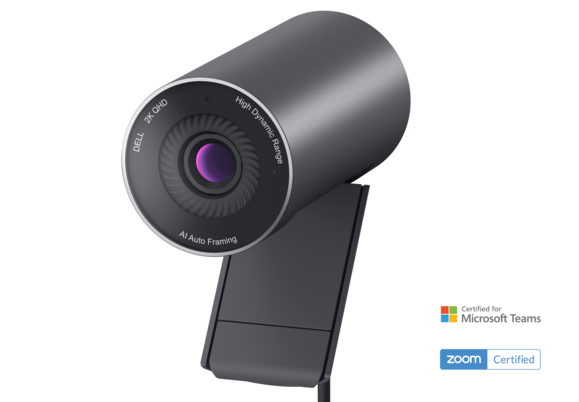
Your needs, this model
Does it fit your priorities?
Does the WB5023's 2K label mean it supports a 4K webcam mode?
No. Dell's model-specific guide lists 2K QHD at 30 fps and separate Full HD/HD modes; it does not list a 4K mode. A 2K QHD camera should not be matched to a 4K requirement.
Explore this need in the finder →Can the WB5023 meet a Full HD 60 fps requirement?
Dell's model guide lists Full HD at 60 fps over the documented USB 2.0 camera arrangement. It lists 2K QHD at 30 fps separately, so 60 fps should not be carried over to 2K.
Explore this need in the finder →Does the WB5023 have a built-in physical shutter?
No integrated shutter is documented. Dell's model guide lists a magnetic external lens cap that must be placed over the camera; that is different from a shutter built into the body.
Explore this need in the finder →Can the WB5023 provide camera-side microphone audio?
It has an omnidirectional built-in microphone, but Dell says the mic is disabled by default and must be enabled in Dell Display and Peripheral Manager. Check that software and the selected app on the intended computer; no sound-quality claim is made.
Explore this need in the finder →Is the U.S. WB5023 SKU documented as TAA compliant?
The reviewed Dell U.S. material does not explicitly identify manufacturer part CKC52 as TAA compliant. Treat that status as unknown and ask the procurement owner to verify the exact SKU and purchasing route.
Explore this need in the finder →Dell's Pro Webcam WB5023 is an earlier USB 2.0 model with a useful split: 2K QHD at 30 fps, or Full HD at up to 60 fps. It also has autofocus and built-in microphone hardware, but the mic starts disabled, and the magnetic lens cap is not a shutter integrated into the camera. This is a document-based assessment, not a hands-on test. A stale Dell U.S. listing record identifies manufacturer part CKC52 and Dell part 319-BBJJ; the current QHD filter shows WB3023 only and the WB5023 product path redirects, so no live offer or stock claim is made.
Separate the 2K and Full HD modes
Dell's model guide lists 2K QHD at 30 fps, Full HD at 30 or 60 fps, and HD at 30 or 60 fps. This review credits those pairings separately: 1440p30 and 1080p60 are documented, but 1440p60 and 4K are not. A 2K QHD label does not satisfy a 4K requirement, and a 60-fps maximum should not be combined with the maximum resolution into a mode Dell does not list.
The Full HD 60 fps option may suit someone who prefers a higher documented frame rate at 1080p and accepts an earlier model. It is a source-listed mode, not a promise that a particular meeting app or computer will expose it. Check the application's camera controls before relying on it; the finder includes WB5023 only when earlier models are enabled.
USB 2.0 and desk setup
Dell's guide identifies an included 1.5 m USB 2.0 cable and a USB-A computer-side connection. It says the camera can connect through a hub or dock; a monitor route needs the monitor's USB upstream cable connected to the computer. Before ordering, verify that the seller's package has the expected lead and that the computer, adapter, hub or monitor provides a suitable data path and enough cable reach.
The guide lists Windows 10 64-bit, Windows 11 and macOS 12.3.1, but this model-specific documentation is not a guarantee of current software support. Confirm current Dell Display and Peripheral Manager support for the exact computer and video app instead of treating an older operating-system table as a present-day compatibility promise.
Autofocus and framing controls
Dell specifies autofocus, selectable 65-degree or 78-degree fields of view, 4x digital zoom and a Sony STARVIS sensor. It describes single-user auto-framing when the person is within 2 m. Those are useful controls to compare on paper, but the specifications do not establish how quickly autofocus reacts or how the image looks in a particular room; no focus-speed, tracking or low-light test was performed.
Set the camera near eye level and check both field-of-view settings against the intended background. A wider angle includes more of the room, while the narrower option trims the view; neither replaces moving a camera whose angle or distance is wrong. The universal clip has a tripod-adapter thread, but Dell says the separate tripod is not included.
Microphone and privacy require separate checks
The model guide describes an omnidirectional built-in microphone with up to 2 m pickup range. Crucially, Dell says the mic is disabled by default and must be enabled in Dell Display and Peripheral Manager. After enabling it, select the camera mic in the conferencing app and check app permissions and input selection. The published range is not a sound-quality test.
Dell lists a magnetic external privacy cover or lens cap. It must be placed over the lens by hand; it is not a built-in sliding shutter. If an integrated physical shutter is essential, this is the wrong configuration even though the separate cap can cover the camera. Dell's U.S. unboxing transcript lists the camera and printed warranty, safety/environmental/regulatory, and quick-start documents, but does not tie that carton to the historical U.S. part 319-BBJJ or every seller's package. Check the exact offer.
How it differs from newer Dell webcams
WB3023 is a close same-brand contrast: its guide lists 1440p30, 1080p30 and 720p30/60, not 1080p60. It has an integrated sliding shutter, while its built-in mic also starts disabled until enabled in Dell software. WB5023's distinct Full HD 60 fps mode may matter more to some callers, but it gives up that integrated shutter and remains in the earlier-model comparison.
Dell's current U.S. webcam category also lists the newer Pro 5 WB526 and Pro 7 WB726. The Pro 7 is a separate 4K model with its own microphone, shutter and host limits; read its individual assessment rather than assuming features transfer across Dell models. A stale WB5023 listing was marked temporarily out of stock, the present QHD filter contains only WB3023, and the direct WB5023 product route redirects. That supports an earlier-model grouping but does not prove Dell has formally discontinued it or establish any seller's current inventory.
Who should consider WB5023?
Keep it on an earlier-inclusive shortlist if autofocus, documented 1080p60 and camera-side microphone hardware matter more than a built-in shutter or 4K. Plan to enable its mic in Dell software. Skip it when a shutter built into the housing, 4K capture or a mic that works without that configuration step is essential.
Before buying, verify the model and U.S. manufacturer part CKC52 / Dell part 319-BBJJ; compare the actual seller package with the guide's 1.5 m USB 2.0 cable and external cap; confirm host, software and application modes; and ask procurement to verify TAA status if required. Dell's reviewed U.S. records do not explicitly establish CKC52 as TAA compliant. Check seller, condition, return terms and availability independently; this assessment makes no live stock or price claim.
Primary references: Dell's U.S. QHD catalogue record, the WB5023 User Guide, Dell's U.S. unboxing and setup video, and Dell's U.S. webcam troubleshooting article.
Key specifications
Key details at a glance
| Documented modes and host limits | 2K QHD is listed at 30 fps; the listed 60 fps modes are Full HD and HD. No 4K mode or 2K60 pairing is documented in the reviewed guide. |
|---|---|
| Focus system | Autofocus |
| Diagonal field of view | 78° |
| Built-in microphone | Yes |
| Physical privacy shutter | No |
| USB 2.0 MJPEG fallback documented | Yes |
Use the exact model’s instructions for operating limits, supplied equipment and version differences.
Sources for this review
Sources for this assessment
- Dell U.S. QHD category's stale indexed record identifying WB5023 manufacturer part CKC52 and Dell part 319-BBJJ
- Current opened Dell U.S. QHD filtered category, one result (WB3023)
- Dell Pro Webcam WB5023 User Guide
- Dell U.S. camera troubleshooting article naming WB5023 as an external USB webcam
- Dell U.S. WB5023 product route; current redirect check
- Dell U.S. Support unboxing and setup video for WB5023
- Dell U.S. product-page hero image for WB5023; body image only
Compare the features that affect your setup
Set essential video, focus, privacy and microphone requirements together; leave nonessential choices open.